How to Add a Horizontal Line (Divider) in Markdown
To add a horizontal line in Markdown, put three dashes ---, three asterisks *** or three underscores ___ on a line of their own, with a blank line above it. All three render the same thin divider. The blank line is the part people forget: without it, --- under a line of text turns that text into a heading instead.
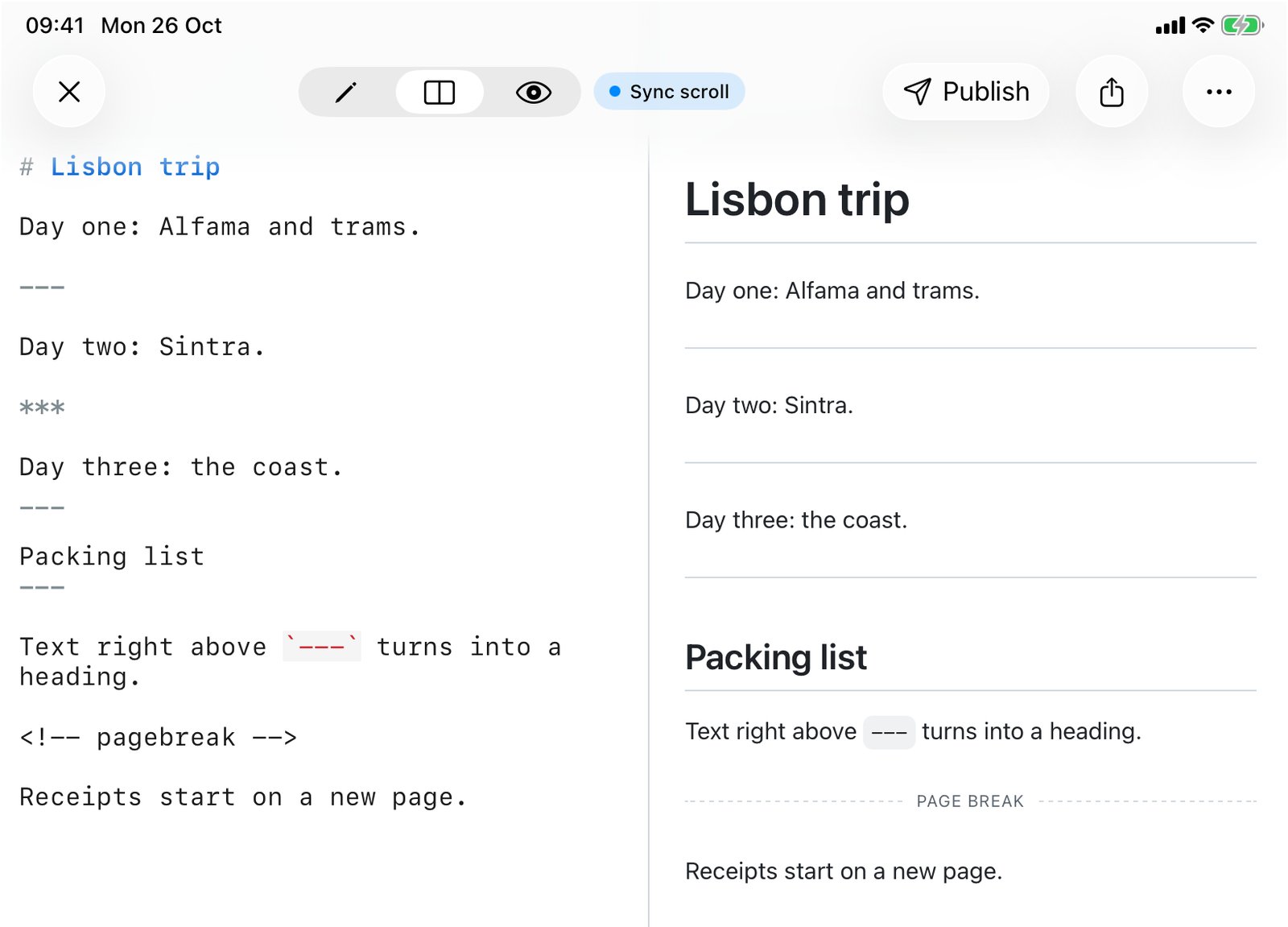
To check every rule below I ran 25 small inputs through QuickMark's renderer (markdown-it, the same code behind the app, Quick Look and published pages), and sent the ones that looked odd through GitHub's Markdown API too. Where the two disagree, I say so.
The three ways to write it
Day one: Alfama.

---

Day two: Sintra.

***

Day three: the coast.

___

Done.Day one: Alfama.
Day two: Sintra.
Day three: the coast.
Done.
There is no difference in output. Pick one and stick with it so the file reads consistently. Most people use --- because it's the easiest to type, which is exactly why it's also the one that causes trouble (next section).
The rule is a bit looser than "exactly three":
| Line | Result |
|---|---|
---, ***, ___ | Divider |
---------- (any length, 3 or more) | Divider |
- - - or * * * (spaces or tabs between) | Divider |
--- (up to 3 spaces of indent) | Divider |
--- (4 spaces) | A code block showing --- |
-- (only two) | Text, not a divider |
-*- (mixed characters) | Text, not a divider |
--- see below (anything else on the line) | Text, not a divider |
The trap: --- right under text makes a heading
Markdown has an old way of writing headings: underline a line with === for a level 1 heading or --- for a level 2. So when you type a line of text and put --- on the very next line, you don't get a divider. You get that text as a big H2.
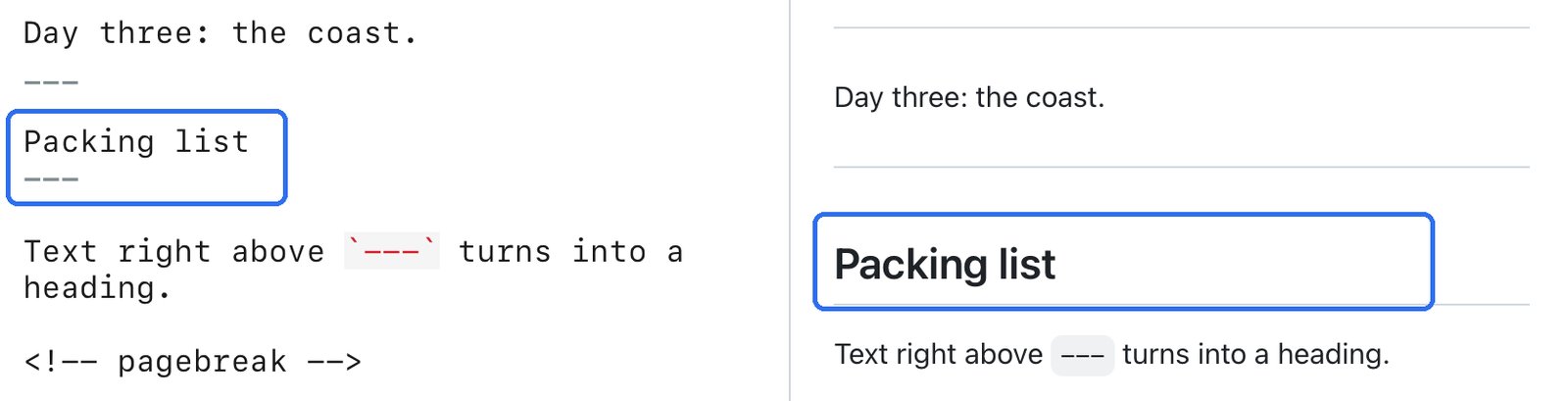
GitHub does the same thing, so this isn't an app quirk. It's the spec. Three ways out:
- Add a blank line between the text and
---. This is the fix you want almost every time. - Use
***or___instead. Only dashes double as a heading underline, soSome textfollowed directly by***gives a paragraph and then a divider, no heading. I checked both in QuickMark and on GitHub. - Escape it if you really want the dashes as text:
\-\-\-. More on escaping in How to Escape Special Characters in Markdown.
If you want a heading, that's fine too, but write it with ##. It's easier to spot when you come back to the file. Markdown headings covers the rest.
--- on the very first line is front matter
A file that starts with ---, then some key: value lines, then another --- is not two dividers. That's YAML front matter, the metadata block used by Jekyll, Hugo and Obsidian. QuickMark shows it as a small table at the top of the preview instead of rendering the lines as text.
The opening --- only counts as front matter when a closing --- follows. A file that begins with a lone --- and then a blank line just gets a divider at the top. If you meant a divider and see a table, the closing line is the reason. Details in Front matter (YAML) in Markdown, explained.
Dashes inside a sentence get smartened
This one surprised me. QuickMark turns on markdown-it's typographer, the same feature that curls straight quotes. So two hyphens in running text become an en dash, and three become an em dash. A line like --- see below isn't a divider (there's text after the dashes), and it doesn't stay as three hyphens either: the preview shows a single long dash followed by "see below".
GitHub leaves -- and --- in text exactly as typed. Neither is wrong; they're different defaults. If you need literal hyphens in QuickMark's preview, escape them (\-\-) or put them in backticks.
Can you style the line?
Not with Markdown syntax. There is only one divider, and the reading theme decides how it looks: in QuickMark it's a 1px line in the theme's border color with some space above and below, and it follows the theme in light and dark mode.
Writing HTML doesn't get you further. <hr> works and renders the same divider, but <hr style="border: 2px solid red"> comes out as a plain <hr>. QuickMark renders inline HTML through a sanitizer that removes style attributes, because it previews files you didn't write (Quick Look, shared files, published pages). GitHub strips the style as well; I sent the same input through its API and got a bare <hr> back.
A divider is not a page break
When you print or export a PDF, --- is still just a line. The next section carries on right below it on the same page. Markdown has no page-break syntax at all, so people borrow HTML, and QuickMark recognizes the common forms on a line of their own:
Day three: the coast.

<!-- pagebreak -->

Receipts start on a new page.Day three: the coast.
PAGE BREAK
Receipts start on a new page.
Also accepted: <!-- page-break -->, <div class="page-break"></div>, and the <div style="page-break-after: always;"></div> that Typora, Obsidian and Pandoc users tend to have in their files already. On screen it's a dashed line labelled "Page break" so you can see where it is. In print it becomes a real break. That works on Mac (File ▸ Print and Export as PDF) and on iPhone and iPad (Print, and the PDF export, which switches to paged output only when the document contains a break). The full export story is in How to convert Markdown to PDF on Mac and iPhone.
What happens to the line when you export
- PDF, PNG, HTML, published web page: the same thin rule you see in the preview.
- Word (.docx): an empty paragraph with a light gray bottom border, so it still reads as a divider and you can restyle it in Word.
Quick reference
| You want | Write |
|---|---|
| A divider | Blank line, then ---, *** or ___ |
| A divider straight under text, no blank line | *** (dashes would make a heading) |
| Three literal dashes | \-\-\- or `---` |
| A new page in print or PDF | <!-- pagebreak --> |
Everything else in Markdown fits on one page in the Markdown cheat sheet.
Get rendered Markdown previews everywhere
QuickMark is a free, native Markdown app for Mac, iPhone and iPad. Live preview, export and publish built in.