QuickMark vs MarkEdit: two native Mac Markdown apps
Short answer: MarkEdit is a free, open-source, deliberately minimal Markdown text editor for Mac. Think TextEdit, but for Markdown. QuickMark is a Markdown reader and writer that comes with the rendered side already switched on: preview pane, Quick Look in Finder, math, diagrams and export, all in the box. If you love a bare editor and enjoy assembling your own extensions, MarkEdit. If you want to open a file and immediately see it properly rendered, QuickMark.
I make QuickMark, so weigh the framing accordingly. What I can promise is accuracy: everything below about MarkEdit is checked against its own README, wiki and release notes, and where MarkEdit is the better choice I say so plainly.
The one-line difference
MarkEdit describes itself as "just like TextEdit on Mac but dedicated to Markdown", and that is a design goal, not a limitation. It edits plain text beautifully, follows the GitHub Flavored Markdown spec strictly, and stays around 4 MB. Rendering is somebody else's job: preview lives in a separate official extension called MarkEdit-preview.
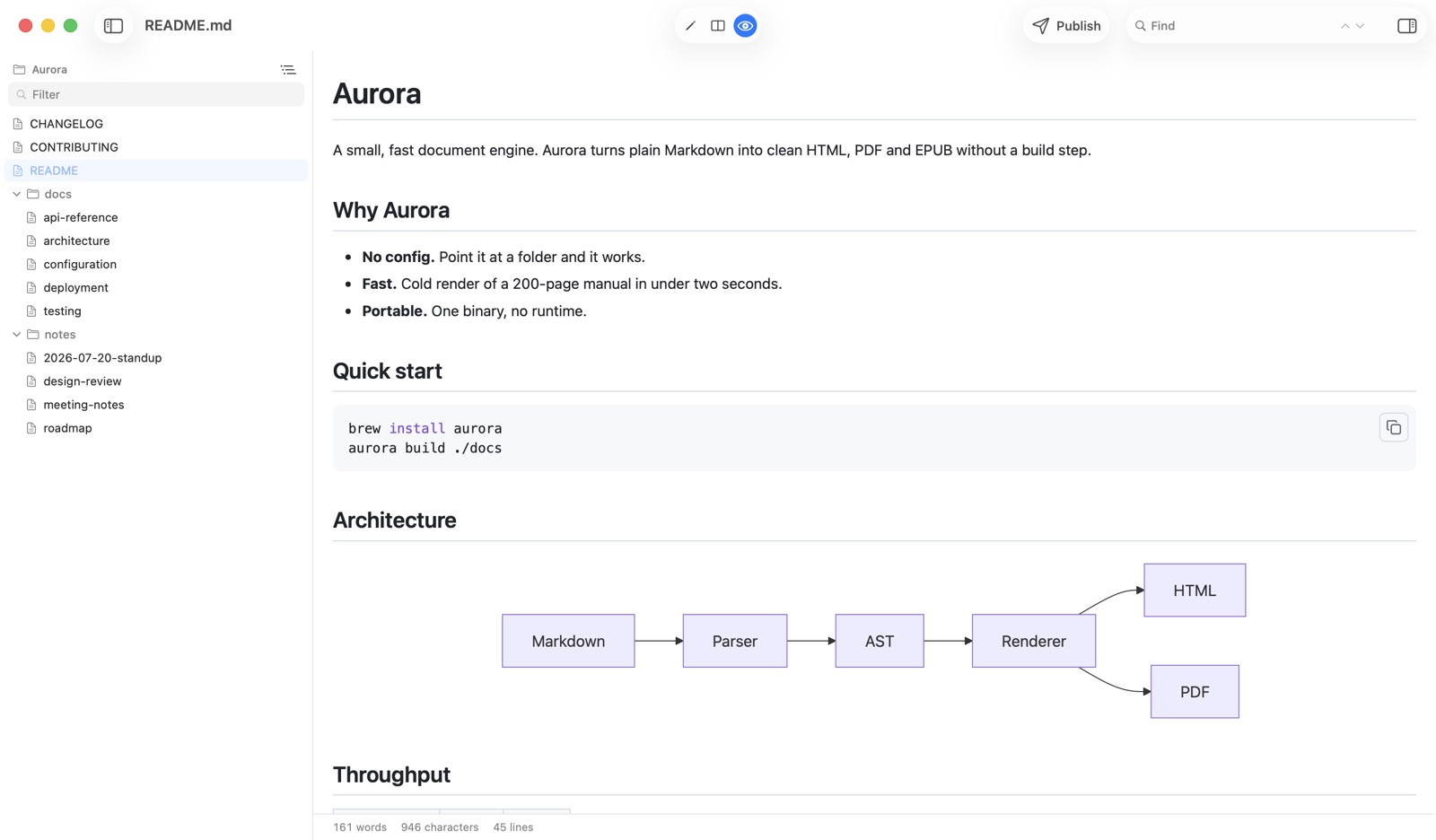
QuickMark starts from the other end. The rendered view is the point: three modes (editor, split with synced scrolling, preview only), plus a Quick Look extension so .md files render in Finder without opening anything.
Where MarkEdit wins
- It's free and MIT-licensed. Free as in price and free as in you can read every line, fork it, or keep building it if the author stops. For a tool you'll put years of writing through, that is a real form of insurance, and QuickMark cannot offer it. QuickMark is closed source.
- It's tiny and feels like a system app. Around 4 MB, with native touches like force-touch word lookup and inline predictions. The README says it handles 10 MB files easily. If your instinct is that a Markdown editor should feel like TextEdit, MarkEdit is that instinct made real.
- Serious plain-text editing. Multi-caret editing and code folding, via CodeMirror 6. QuickMark's editor is deliberately simpler; if you edit like a programmer, you will notice what's missing.
- Extensions, including a Vim mode. There are eleven official ones: Vim keybindings, a Markdown table editor, Prettier formatting, a Harper-based grammar checker, an on-device AI writer, and more. Nothing in QuickMark is pluggable. If you want Vim keys in your Markdown editor, this decides it.
- Scriptable and customisable. AppleScript and Shortcuts support, plus your own CSS and JavaScript. If you automate your Mac, that surface matters.
- Runs older macOS too. Current builds need macOS 15, but MarkEdit publishes older builds for macOS 12, 13 and 14.
Where QuickMark wins
- Rendering is already on. Preview, math and diagrams need no install, no restart, no extensions folder. MarkEdit's preview and its Quick Look support both arrive through the MarkEdit-preview extension (Quick Look landed in MarkEdit 1.33.0), and after installing extensions you restart the app. Both routes end up rendering your Markdown; one of them is a download and a decision.
- Press Space in Finder, out of the box. QuickMark ships its Quick Look extension inside the app, so any
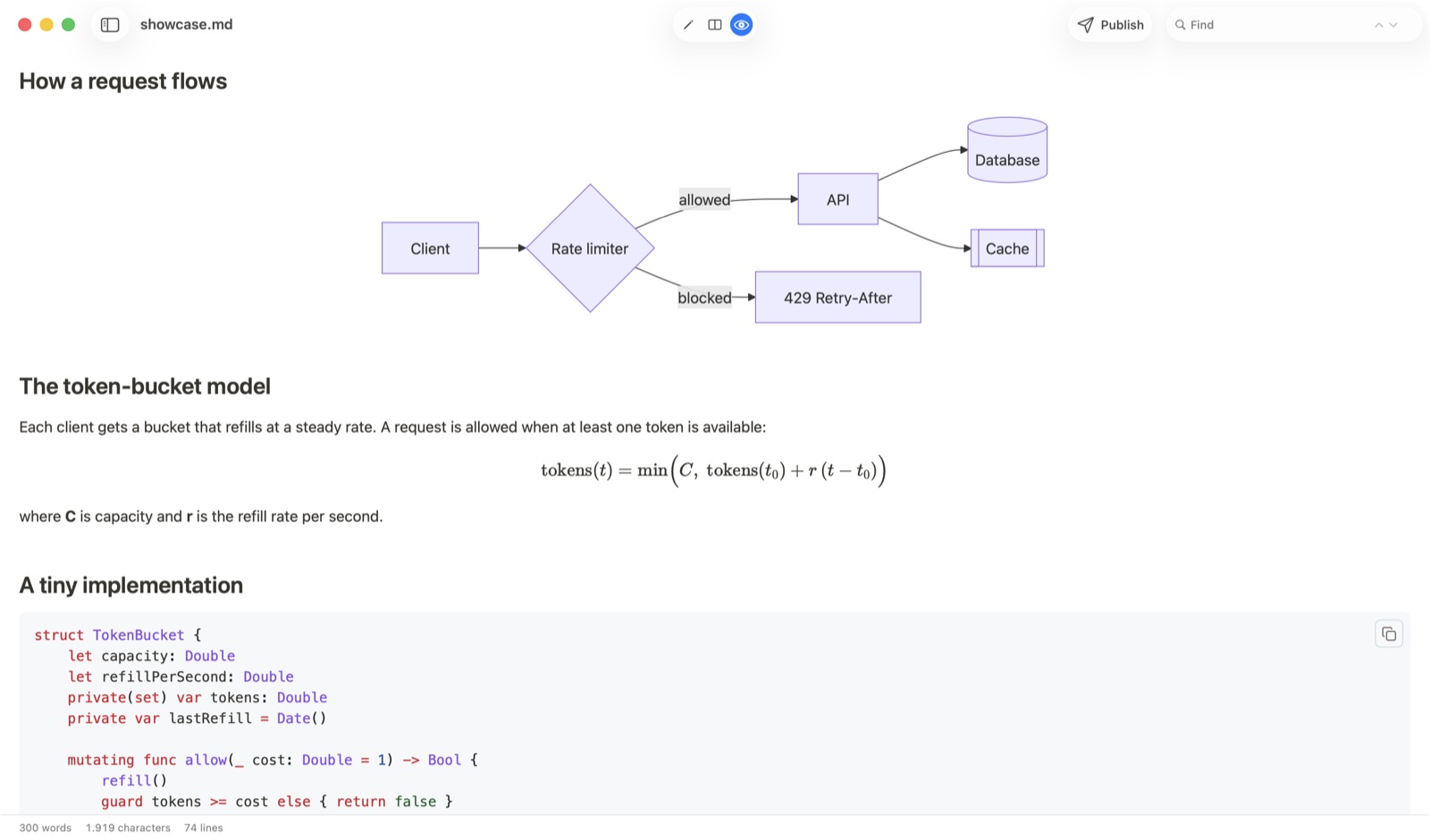
.mdfile renders the moment you tap the space bar. Here's what that looks like. - Math and diagrams are built in. KaTeX and Mermaid render inline, and that's the screenshot above. MarkEdit's own README doesn't list either; what you get depends on the preview extension you install.
- Export to six formats. PDF, HTML, Word (.docx), EPUB, PNG and rich text you can paste into an email. Exporting to PDF is one menu item.
- A folder navigator. A sidebar lists every Markdown file beside the one you have open, flat or as a tree through subfolders, so a docs directory behaves like a small project.
- iPhone and iPad. MarkEdit is Mac-only. QuickMark is one Universal app across Mac, iPhone and iPad, sharing the same renderer, with a split view on iPad.
- Free to read and write. Editing, split view, preview, tabs, themes, Quick Look and printing cost nothing, with no trial clock.
Side by side
| QuickMark | MarkEdit | |
|---|---|---|
| Platforms | macOS, iOS, iPadOS | macOS only |
| Minimum macOS | 14 (Sonoma) | 15 (older builds for 12-14) |
| Preview pane | Built in (editor / split / preview) | Via the preview extension |
| Preview in Finder (Space) | Built in | Via the preview extension (1.33.0+) |
| Math & Mermaid diagrams | Built in | Not in the README; depends on the extension |
| Multi-caret & code folding | No | Yes |
| Vim keybindings | No | Yes, via extension |
| Extensions / plugins | No | Yes, 11 official |
| Export PDF / HTML / Word | Yes (+ EPUB, PNG, rich text) | Not listed in the README |
| Publish as a web link | Yes | No |
| Folder / file navigator | Yes | No |
| Open source | No | Yes (MIT) |
| Where you get it | Mac App Store | GitHub releases or Homebrew |
| Cost to read & write | Free | Free |
How to choose in ten seconds
- Open source matters to you → MarkEdit.
- You want Vim keys, multi-caret, or an extension you can write yourself → MarkEdit.
- You want the smallest possible TextEdit-like editor → MarkEdit.
- You read as much Markdown as you write, in Finder → QuickMark.
- You want math and diagrams to just render → QuickMark.
- You want the same app on your iPhone and iPad → QuickMark.
A note on installing MarkEdit's extensions
This is the one place the two apps really diverge in feel, so it's worth being fair about it. MarkEdit's extension system is a strength, not a hoop: eleven official extensions, each doing one thing, and you take only what you want. The cost is that the rendered preview, the thing many people assume a Markdown app has on day one, is one of those things you take. You install it, then restart the app.
Whether that's friction or freedom genuinely depends on you. Plenty of people prefer a small editor they assembled themselves over a bigger one that decided for them.
Both apps keep your work in plain .md files, which is the real safety net: whichever you try, nothing is locked in and switching costs almost nothing. Try one for a week. If it doesn't fit, your files come with you.
Want to see how QuickMark renders your own Markdown before installing anything? Paste it into the live preview in your browser.
Get rendered Markdown previews everywhere
QuickMark is a free, native Markdown app for Mac, iPhone and iPad. Live preview, export and publish built in.