QuickMark vs Marked: previewer plus your editor, or one app for both?
Short answer: Marked is a preview window for the editor you already love. You keep writing in BBEdit, Scrivener, VS Code or Obsidian, and Marked shows the formatted result every time you save. QuickMark is one app that both reads and writes: preview, editor, split view, and a Quick Look extension so .md files render in Finder when you tap the space bar. If you have a writing tool you would never give up, Marked slots in beside it. If you want to open a file and just read or edit it, QuickMark is the shorter path.
I make QuickMark, so weigh the framing accordingly. Everything below about Marked is checked against its own site and its developer's release notes, and where Marked is the better tool I say so.
First, which Marked are we talking about?
Worth clearing up, because the naming trips people. Marked 3 shipped on 18 May 2026 and is the current version. Marked 2 did not disappear: its developer says it "will continue to be available" as a one-time purchase, though it now gets maintenance updates only. So if you are searching for a Marked 2 alternative, you are comparing against an app that still works and is still sold, just no longer the one getting new features.
Marked is Mac-only in both versions. Marked 2 lists macOS 10.12 or later; the Marked 3 announcement does not state a minimum, so check before you buy if you are on an older Mac.
The one-line difference
Marked describes itself as "a previewer for Markdown and other plain text markups", and the workflow it is built around is "edit in any editor, preview live in Marked." That is a deliberate design, not a gap. It means Marked never fights your editor, and it means you are running two apps.
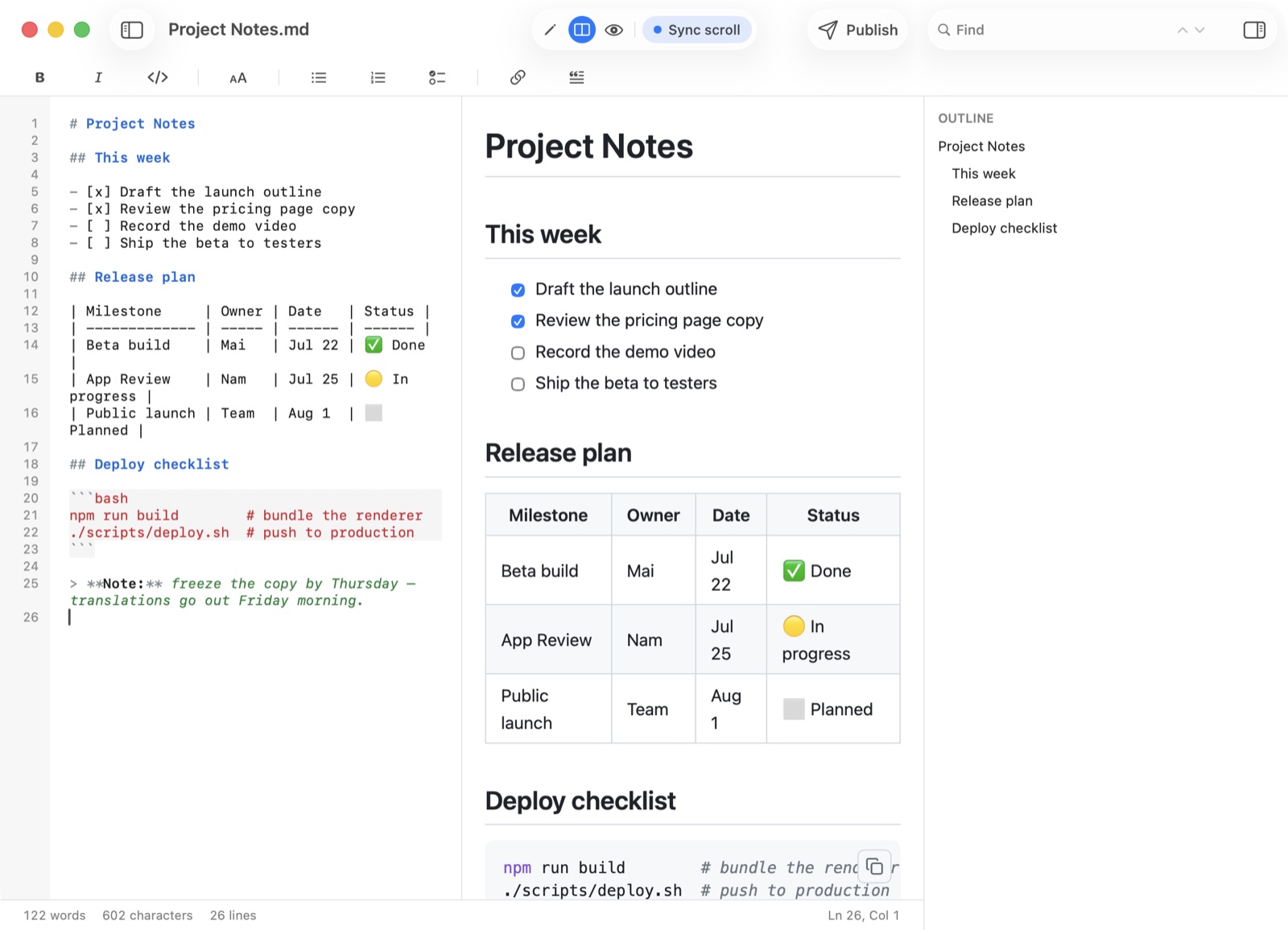
QuickMark collapses that into one window. Three modes, editor, split with synced scrolling, and preview only, plus the thing Marked's own pages never mention: a Quick Look extension, so a .md file renders in Finder without opening any app at all.
Where Marked wins
- It works with the editor you refuse to leave. Marked names Scrivener, MarsEdit, VoodooPad and Fountain among the tools it plugs into. If your book lives in Scrivener, this is the whole argument and nothing else matters. QuickMark has no integrations of that kind.
- Word export is in a different league. Marked 3 claims "100% accurate DOCX files, with element styles, built-in templates," converts math into Word's native equation format, and reads DOCX back into Markdown. QuickMark exports
.docx, but it does not pretend to match that fidelity, and it cannot import Word at all. - Real document analysis. Word count, reading time, Fog Index and Flesch-Kincaid scores. If you are edited against a readability target, QuickMark gives you nothing comparable.
- More than one markup, and rules to control them. Marked 3 moved its default to CommonMark, added Kramdown with inline attribute lists, and replaced the old single preprocessor with a rules system that can switch behaviour by file extension, location or metadata. QuickMark renders one flavour and offers no processing hooks.
- Styling you can drive properly. Custom styles have always been there, and Marked 3 adds a style generator plus a "Style Stealer" for lifting a look off a site. QuickMark ships themes you pick from; you do not write your own CSS.
- Small tools that add up. A built-in Dingus for testing syntax, and a speed-reading mode. Nothing in QuickMark does either.
Where QuickMark wins
- It writes, too. This is the core of it. Marked previews what another app edits; QuickMark edits and previews in the same window, with synced scrolling between the two panes. One app, one window, no arranging.
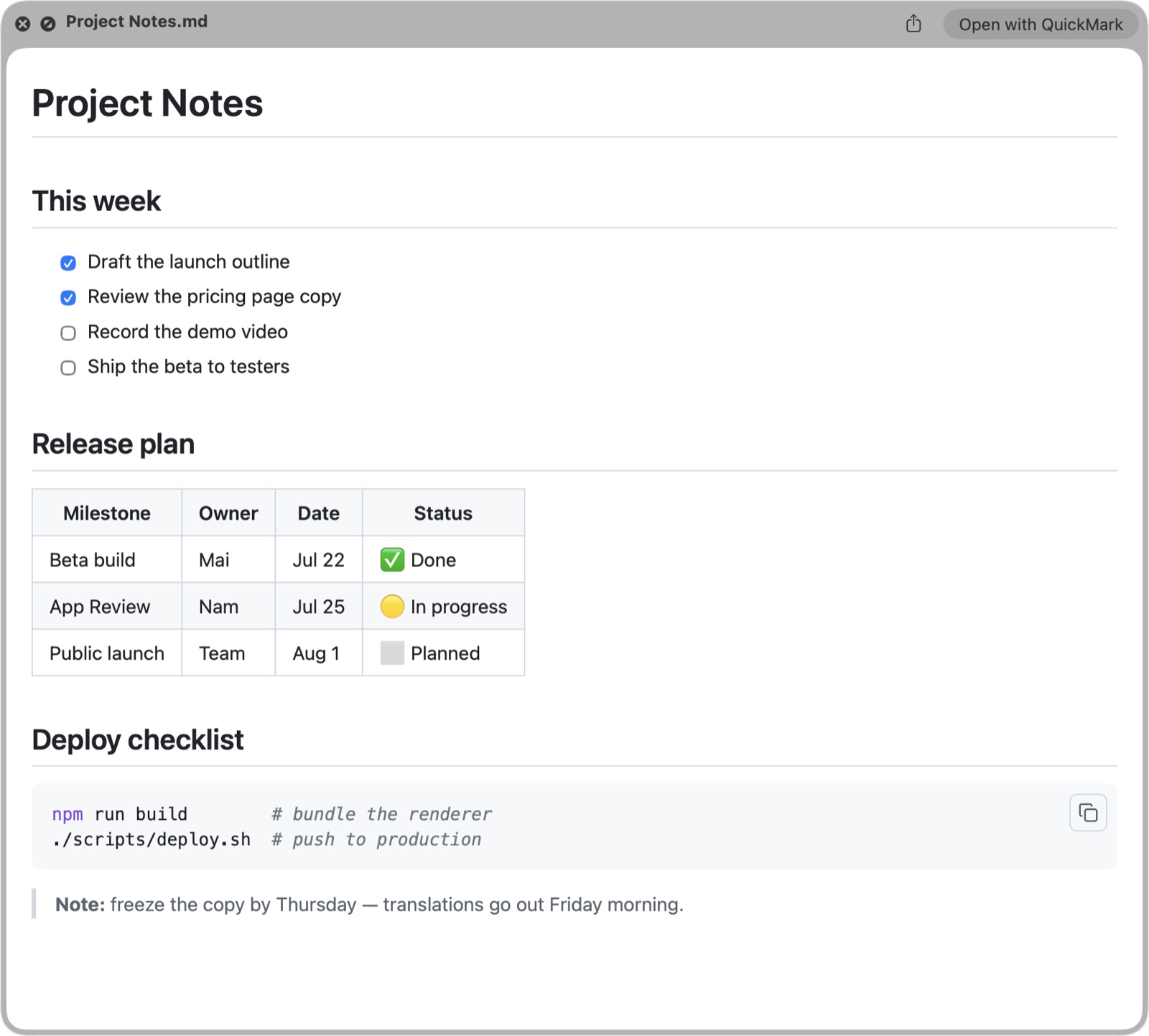
- Press Space in Finder. The Quick Look extension ships inside the app, so any
.mdfile renders the moment you hit the space bar. Here is what that looks like. For skimming a folder of READMEs this beats opening a preview window every time. - iPhone and iPad. Marked is Mac-only. QuickMark is one Universal app across Mac, iPhone and iPad, sharing the same renderer, with a split view on iPad.
- Diagrams in the box. Mermaid flowcharts and KaTeX math render inline with nothing to install. Marked lists MathJax for math; its own pages do not mention Mermaid, so what you get there depends on what you configure.
- A folder navigator. On Mac, a sidebar lists every Markdown file beside the one you have open, flat or as a tree, so a docs directory behaves like a small project.
- Publish as a web link. Turn any document into a clean read-only page you can send someone, straight from the app.
- Free to read and write. Editing, split view, preview, tabs, themes, Quick Look and printing cost nothing, with no trial clock. Marked is a paid app, sold as a permanent licence or a subscription, and also bundled with Setapp.
Side by side
| QuickMark | Marked | |
|---|---|---|
| What it is | Reader and editor | Previewer for your editor |
| Platforms | macOS, iOS, iPadOS | macOS only |
| Edits your file | Yes | No, by design |
| Preview in Finder (Space) | Built in | Not listed on their site |
| Math | KaTeX, built in | MathJax |
| Mermaid diagrams | Built in | Not listed on their site |
| Export | PDF, HTML, Word, EPUB, PNG, rich text | HTML, PDF, Word (Marked 3 adds DOCX import) |
| Readability scores | No | Yes (Fog Index, Flesch-Kincaid) |
| Editor integrations | No | Scrivener, MarsEdit, VoodooPad, Fountain |
| Custom CSS / processing rules | No, themes only | Yes |
| Folder / file navigator | Yes (Mac) | No |
| Publish as a web link | Yes | No |
| Cost to read and write | Free | Paid, trial available |
Two rows say "not listed on their site" rather than "no". That is deliberate. Marked is highly configurable, so someone may well have wired up Mermaid with a custom processor. I am reporting what the official pages state, not what is impossible.
How to choose in ten seconds
- Your writing lives in Scrivener, Fountain, or an editor you will not leave → Marked.
- You need Word output that survives a corporate review → Marked.
- You are edited against readability scores → Marked.
- You want your own CSS and per-project processing rules → Marked.
- You mostly read Markdown other people wrote, in Finder → QuickMark.
- You want one app that reads and writes, not two → QuickMark.
- You want the same app on your iPhone and iPad → QuickMark.
A fair word about the previewer model
It would be easy to frame "you need a second app" as a flaw. It is not. Marked has been built on that idea for over a decade, and the payoff is that it never has an opinion about how you type. Your editor stays exactly as you configured it, and Marked handles the part editors are bad at. For a novelist in Scrivener or a screenwriter in Fountain, no all-in-one app is going to beat that.
The cost is arrangement. Two apps, two windows, and a preview that only exists while both are open. QuickMark takes the opposite bet: fewer moving parts, less to configure, and rendering available even from Finder. Which bet is right depends entirely on whether you already have a writing tool you love.
One thing both apps get right: your work stays in plain .md files. Nothing is locked in, and switching later costs you nothing but the download. If you also care about how the two compare to other native Mac options, there is QuickMark vs MarkEdit, and if Word and PDF output is what you are really shopping for, exporting to PDF covers that side.
Want to see how QuickMark renders your own Markdown before installing anything? Paste it into the live preview in your browser.
Get rendered Markdown previews everywhere
QuickMark is a free, native Markdown app for Mac, iPhone and iPad. Live preview, export and publish built in.