
Nested and Numbered Lists in Markdown
A bullet list is a dash and a space at the start of each line: - item. A numbered list is a number, a full stop and a space: 1. item. To nest one list inside another, indent the child line until it lines up with the text of the parent, which is two spaces under a dash and three under 1.. That last rule is the one that breaks most lists, and it is the reason this post exists.
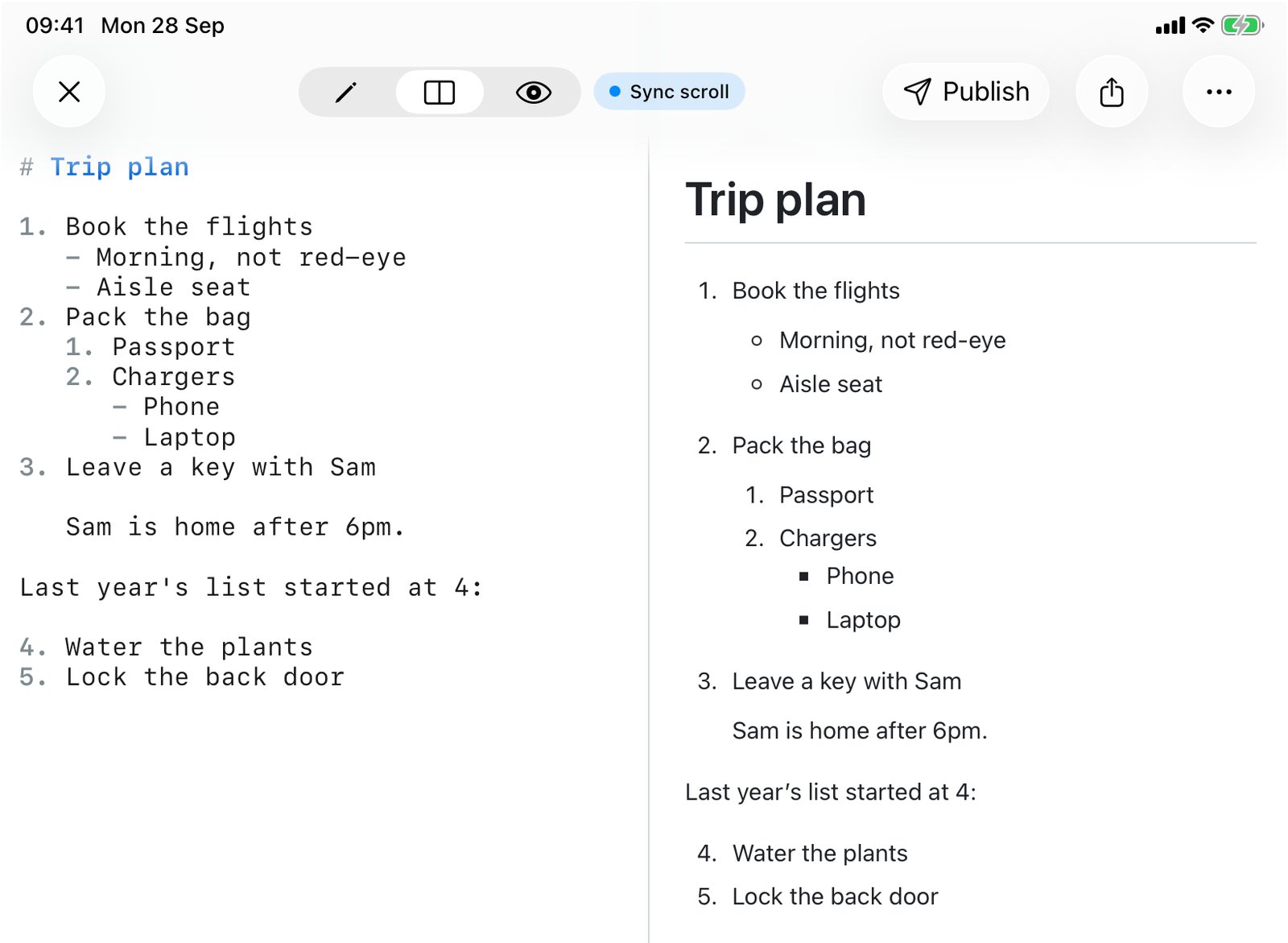
Every result below was run through QuickMark's own renderer, 42 cases in all, rather than copied from a spec. QuickMark follows CommonMark here, so the same file behaves the same way on GitHub and in most other editors.
The two basic lists
- Milk
- Eggs
- Bread

1. Preheat the oven
2. Mix the batter
3. Bake for 20 minutes- Milk
- Eggs
- Bread
- Preheat the oven
- Mix the batter
- Bake for 20 minutes
The space after the marker is required. -Milk and 1.Preheat are plain text, not list items.
Pick one bullet and keep it
Markdown accepts three bullet markers: -, * and +. They are not interchangeable inside one list. Switching marker starts a new list:
| You write | You get |
|---|---|
- a- b- c | One list with three items. |
- a* b+ c | Three separate lists of one item each. |
On screen the second version looks almost right, which is what makes it annoying. The gaps between items are a little too wide and nobody can say why. Pick the dash and use it everywhere. It is also what QuickMark's Bullet List command writes.
Numbered lists count for you
The renderer ignores every number except the first. It takes the first number as the starting point and counts up from there:
| You write | You get |
|---|---|
1. 1. 1. | 1, 2, 3 |
1. 5. 2. | 1, 2, 3. The 5 and the 2 are ignored. |
3. 4. | 3, 4. The list starts at 3. |
0. 1. | 0, 1. Zero is a valid start. |
1) 2) | 1, 2. A closing bracket works as well as a full stop. |
1. then 2) | Two lists. Mixing the full stop and the bracket splits them, like mixing bullets. |
So writing 1. on every line is a real technique, not laziness: you can reorder or insert steps and the numbers stay right. The cost is that the raw file no longer tells a reader which step is number seven. For short lists I write the real numbers; for long ones that change often I write all ones.
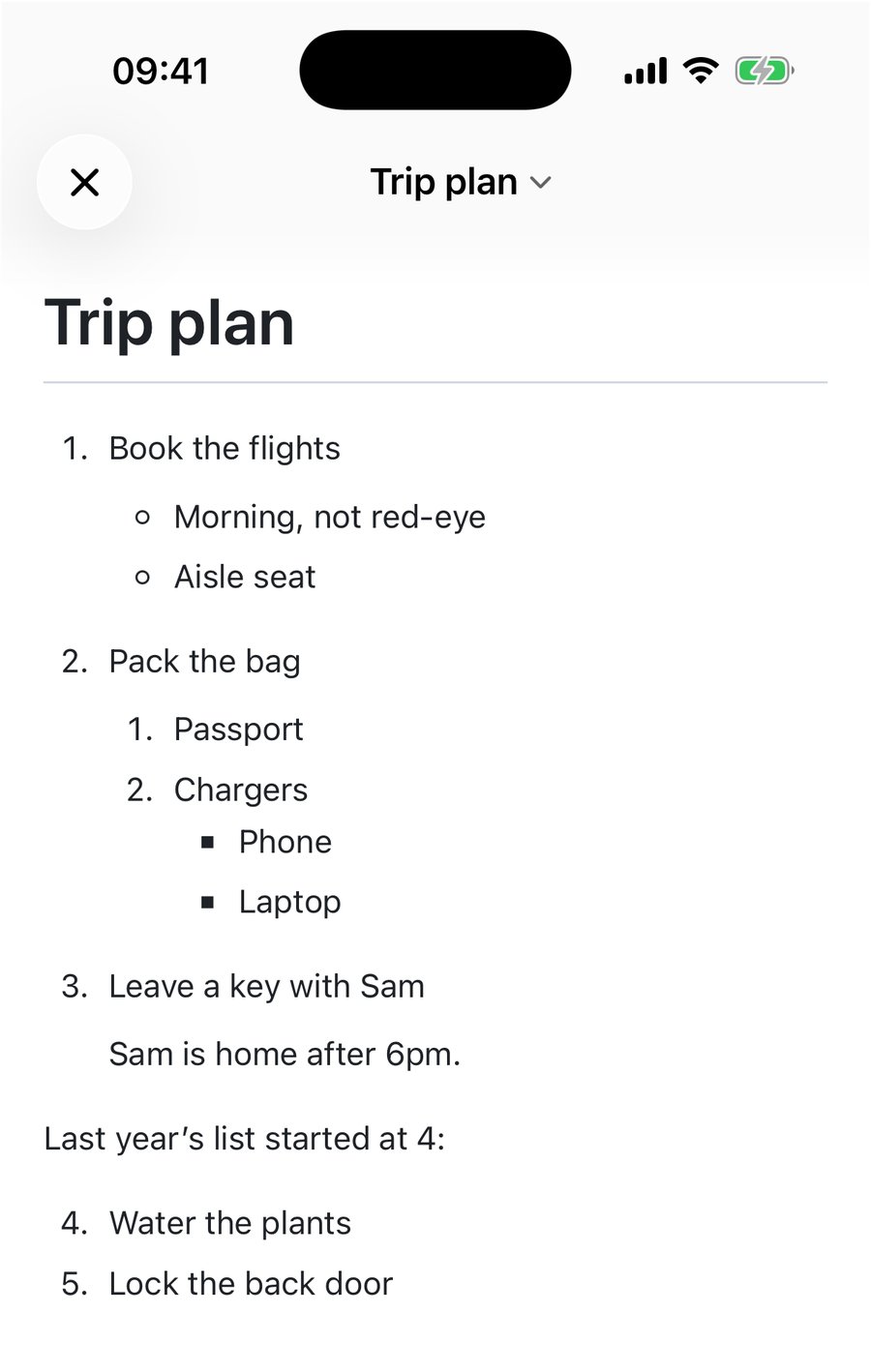
The start number is how you continue a list after a paragraph. In the screenshot above, "Water the plants" is written as 4., so the second list picks up where a reader expects instead of going back to 1.
Nesting: line up with the text, not the marker
This is the rule. A child item belongs to the parent when its marker starts at or past the column where the parent's text starts. How many spaces that takes depends on how wide the parent's marker is:
| Parent line | Child needs | With one space fewer |
|---|---|---|
- a | 2 spaces | 1 space: the "child" becomes a sibling at the same level |
1. a | 3 spaces | 2 spaces: the parent list ends and a new bullet list starts below it |
10. a | 4 spaces | 3 spaces: same, the list is cut in two |
The middle row catches people coming from bullet lists, where two spaces always worked. Under a numbered item two spaces are not enough, and the list does not fail quietly: it ends, and item 2 comes back as a fresh list. The last row is why a list that nests fine for nine items falls apart at item 10.
Two shortcuts that save thinking:
- Four spaces always works for one level of nesting under
-,1.or10.. It is more than the minimum under a dash or a single digit, and exactly right under10.. - A tab also works. A single tab nested correctly under
-,1.and10.in every case I tried.
Mixing is fine. A bullet list can sit inside a numbered item and a numbered list inside a bullet, as the trip plan above does three levels deep. In QuickMark's preview, bullets go from solid to hollow to square as you go down levels. Nested numbered lists stay as 1, 2, 3 at every level rather than switching to a, b, c.
Paragraphs and code inside an item
The same column rule decides whether extra content stays inside an item. Indent it to the item's text and it belongs to the item. Leave it at the margin and it ends the list:
1. Install the app

   It is in the App Store.

2. Open a file

   ```
   open notes.md
   ```

3. DoneInstall the app
It is in the App Store.
Open a file
open notes.mdDone
Take the three spaces off the code block and you get item 1, then a loose code block, then a new list whose first item is numbered 2. The renderer keeps your number, so the page even looks nearly right. It is not one list any more, though, and any tool that restarts numbering will show it.
Five surprises, all measured
| You write | You get |
|---|---|
2026. What a year. | A numbered list starting at 2026. Any line that opens with up to nine digits and a full stop is a list item. Write 2026\. What a year. to keep it as text. |
A paragraph line, then 2. next on the line below | One paragraph. A numbered list can only begin directly under a paragraph line if it starts at 1, so the year problem mostly shows up on the first line of a paragraph. |
| A blank line between items | The same list, but "loose": each item is spaced like a paragraph. Remove the blank lines for a compact list. |
| Two blank lines between two lists | Still one list. Blank lines never end a list. Put a line of text, or an HTML comment <!-- -->, between them. |
- item (4 spaces, no parent) | A code block showing - item. Four spaces of indent with nothing above to nest under means code. |
The blank-line row is the one I hit most. A tight list next to a loose one looks wrong on the page, and the only difference in the file is an empty line you cannot see.
Making lists in QuickMark
On Mac, Format ▸ Bullet List (⇧⌘8) puts - in front of every selected line, and Format ▸ Numbered List (⇧⌘7) numbers the selected lines 1, 2, 3. You do not need to select whole lines: touching any part of a line is enough. The Checklist button on the editor's format bar turns lines into - [ ] tasks, which the checklist post covers in detail. On iPhone and iPad the same three commands sit on the bar above the keyboard.
One thing QuickMark does not do: pressing Return at the end of a list item gives you a plain new line, not the next - or number. Tab inserts a tab, which as shown above is enough indent to nest. If you write long lists all day, an editor that continues the list for you will feel faster. QuickMark's strength is the other half: seeing the finished list next to the source, as in the split view at the top of this post, so a broken indent shows up the moment you type it.
The short version
- Use
-for bullets and never mix markers in one list. - Only the first number counts. Start at 4 to continue a list.
- Indent children to the parent's text: 2 spaces under
-, 3 under1., 4 under10.. Four spaces or a tab is the safe habit. - Escape a leading year with a backslash:
2026\.
The rest of the syntax is on the cheat sheet, and headings are the other tool for giving a long document structure.

Get rendered Markdown previews everywhere
QuickMark is a free, native Markdown app for Mac, iPhone and iPad. Live preview, export and publish built in.