What Is GitHub Flavored Markdown (GFM)?
GitHub Flavored Markdown, or GFM, is the version of Markdown that GitHub uses for READMEs, issues and pull requests. It is standard Markdown (CommonMark) plus five additions: tables, task lists, strikethrough, automatic links and a short list of HTML tags that get blocked. When a tool says it "supports GFM", those five are what it means. Everything else people associate with GitHub, like alerts, Mermaid diagrams, math and @mentions, sits on top of GFM and is not in the spec.
That difference matters as soon as a Markdown file leaves GitHub. A README that looks right on github.com can come out slightly wrong in another app, and it is usually one of a few specific things. So instead of retelling the spec, I took 56 cases, ran each one through QuickMark's own renderer, and checked the results against the GFM spec (version 0.29-gfm) and GitHub's own writing docs. Below you'll find what matches GitHub, what doesn't, and why.
The five things GFM adds
1. Tables
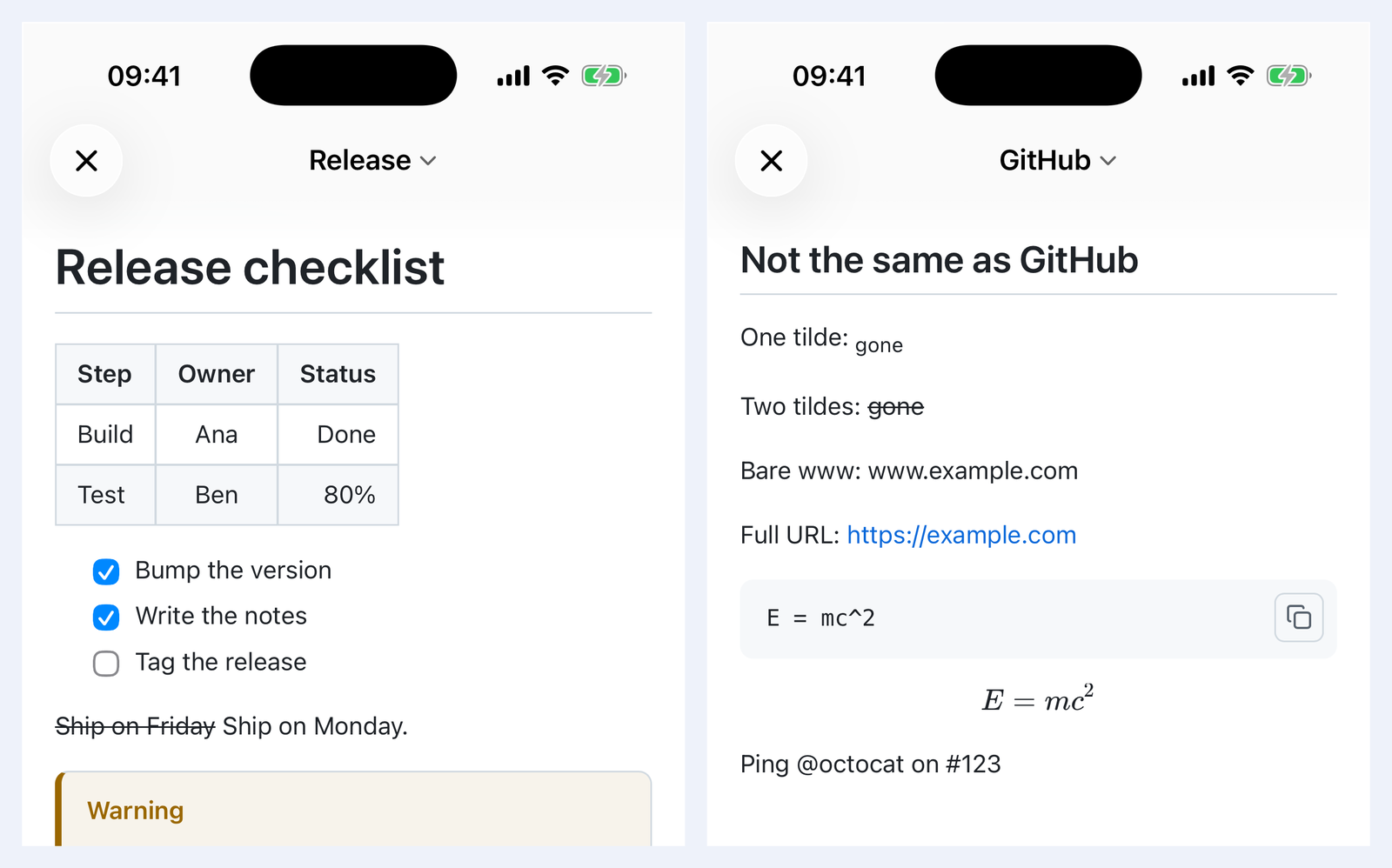
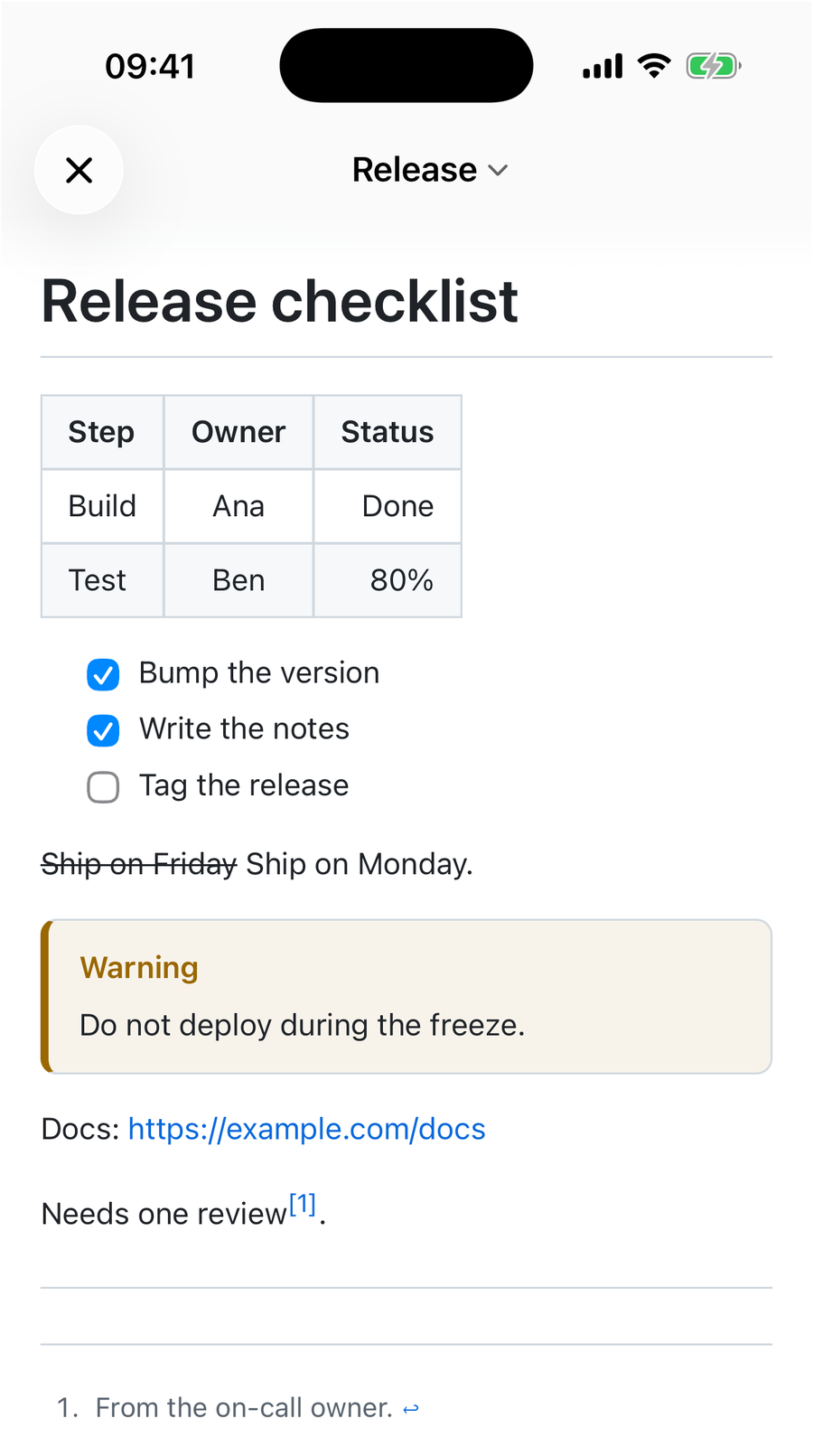
| Step  | Owner | Status |
|:------|:-----:|-------:|
| Build | Ana   | Done   |
| Test | Ben | 80% || Step | Owner | Status |
|---|---|---|
| Build | Ana | Done |
| Test | Ben | 80% |
The colons in the second row set the alignment: left, center, right. The outer pipes are optional, so a | b over --|-- is a valid table too. Three table rules trip people up, and QuickMark follows the spec on all three:
- The header and the dashes row must have the same number of cells. Two headers over one
|---|is not a table. You get the raw pipes back as a paragraph. - Body rows can be short or long. A short row is padded with empty cells. In a long row, the extra cells are silently dropped.
- A pipe inside backticks still splits the cell.
`x | y`in a table becomes two cells. Writex \| yinstead. The spec says to escape the pipe "including inside other inline spans", and GitHub does the same.
More on columns, alignment and wide tables in How to Make a Table in Markdown.
2. Task lists
- [x] Bump the version
- [x] Write the notes
- [ ] Tag the release- ☑ Bump the version
- ☑ Write the notes
- ☐ Tag the release
A capital [X] counts as ticked. The box also works after *, after a number (1. [ ]) and in nested lists. It needs the space inside: [] with nothing in it stays plain text. The full set of checklist tricks is in Markdown checklists.
3. Strikethrough
~~Ship on Friday~~ gives Ship on Friday. This is the first place where GitHub and other apps part ways, and it's covered in the next section.
4. Automatic links
Plain CommonMark only links a URL when you wrap it in angle brackets, like <https://example.com>. GFM also links a bare https://example.com in the middle of a sentence and leaves a trailing full stop out of the link. QuickMark does both. GFM goes one step further and also links www.example.com and user@example.com. QuickMark does not, on purpose. More on that below.
5. Blocked HTML tags
GFM lets you mix HTML into Markdown, but it disarms nine tags: title, textarea, style, xmp, iframe, noembed, noframes, script and plaintext. In QuickMark, all five of the ones I tested (script, iframe, style, title, textarea) show up as visible text instead of running. QuickMark is stricter than the spec here: it only keeps a short allowlist of harmless tags, because it also previews files you didn't write yourself, such as a README in a downloaded repo. Event handlers and javascript: links are removed too.
Where GitHub and other apps differ
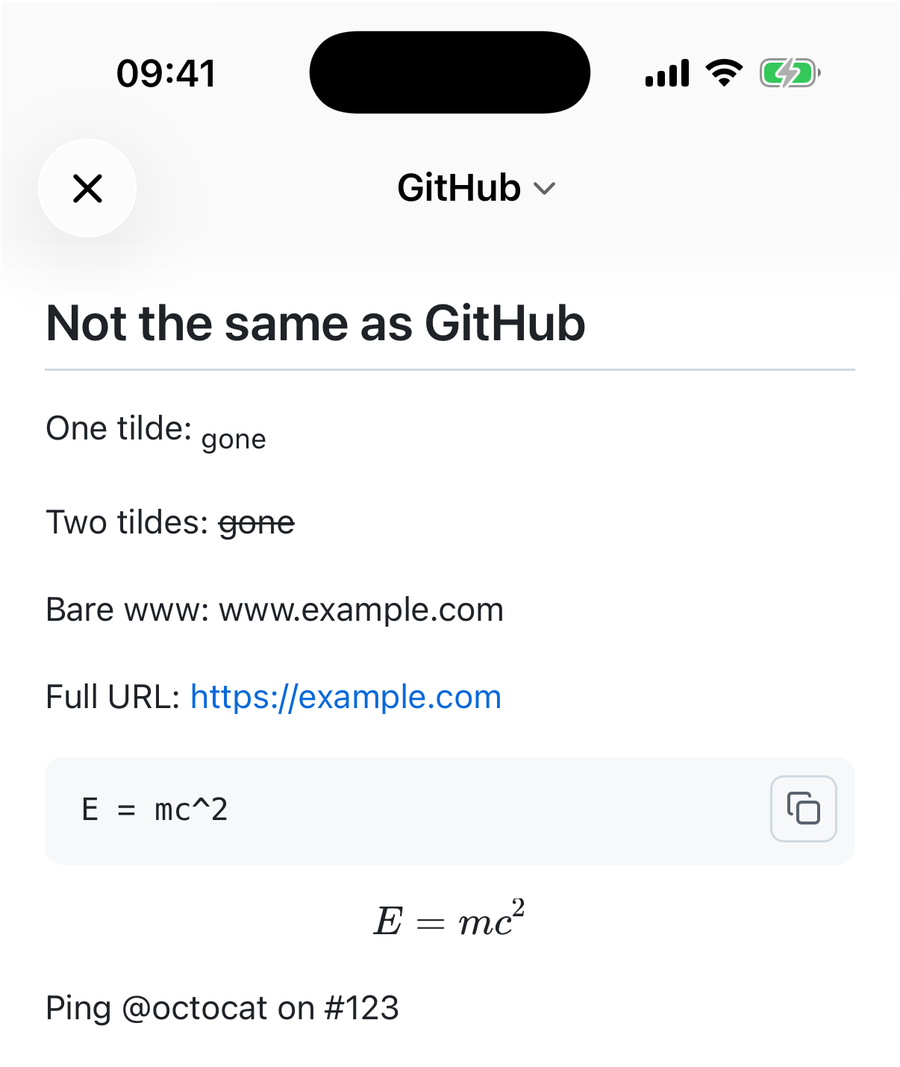
| You write | On GitHub | In QuickMark, and the fix |
|---|---|---|
~gone~ | Struck out. GitHub's docs say one tilde or two both work. | Subscript, the way H~2~O gives H₂O. Fix: use two tildes. They strike text out in every app. |
www. address | A link | Plain text. Fix: write the full https:// address. |
| Bare email | A mailto link | Plain text. Fix: wrap it in angle brackets, <a@b.co>. That is plain CommonMark and works everywhere. |
```math | A formula | A plain code block. Fix: use $$ above and below. Both apps render that. |
| geojson or stl fences | A map or 3D model | The raw text. No equivalent, keep these on GitHub. |
@user #123 | Links to people and issues | Plain text. They need a GitHub repository behind them, so no app outside GitHub can resolve them. |
:shipit: | GitHub's own emoji | The shortcode as text. Standard ones like :tada: work in both. |
| A heading with accents | Anchor keeps the accents | A heading Ünïcode gets the anchor #ncode: letters outside a to z are dropped. Matters only if you link to headings by hand. |
Why doesn't QuickMark link a bare www.? It's the price of a different rule. With loose link detection on, a file name like README.md or CLAUDE.md becomes a link to a website, because .md is Moldova's country domain. In notes full of file names, that's far more annoying than typing https://. So QuickMark only links text that starts with a real scheme. If you write a lot of bare www. addresses, GitHub handles that better.
The single-tilde case is the one most likely to bite. A README with ~deprecated~ looks struck through on GitHub and turns into small lowered text in QuickMark. Two tildes avoid the whole question.
GitHub extras that are not in the spec, but work anyway
These all came from GitHub but are not part of GFM. Everything in this table renders in QuickMark exactly as you would write it for GitHub:
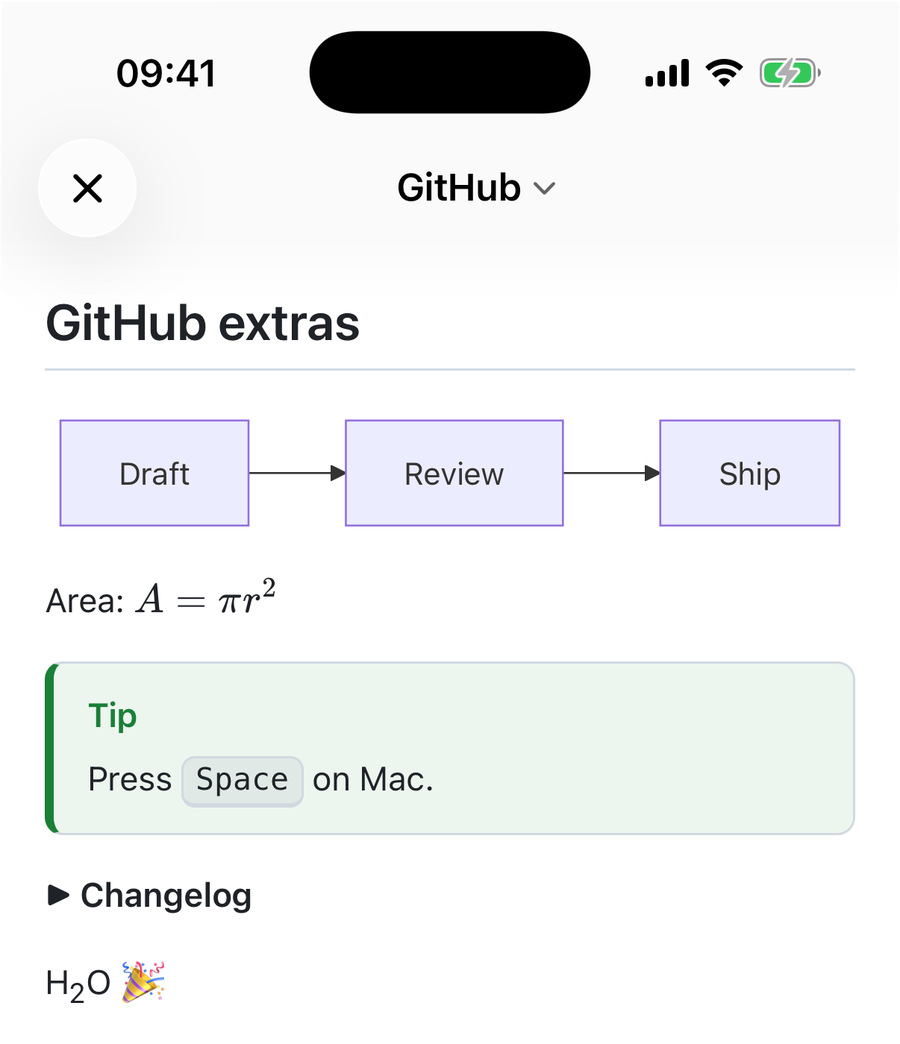
<kbd> key, a <details> block and emoji, all from the same source you'd commit to GitHub.| Feature | Syntax | Notes from testing |
|---|---|---|
| Alerts | > [!NOTE] | All five GitHub types work: NOTE, TIP, IMPORTANT, WARNING, CAUTION. Lowercase [!note] works too. A custom title after the type (> [!NOTE] Heads up) also works in QuickMark, which is Obsidian's style. That one is not listed in GitHub's docs. See blockquotes and callouts. |
| Footnotes | [^1] | Numbered, linked both ways. 31 more cases in How to Add Footnotes. |
| Mermaid diagrams | ```mermaid | Same fence as GitHub. See Mermaid in Markdown. |
| Math | $x$ $`x`$ $$ | All three GitHub delimiters render, including the backtick form GitHub added for formulas that contain Markdown characters. Only the ```math fence is missing. See math in Markdown. |
| Collapsible sections | <details> | Works, including Markdown inside when you leave a blank line after the summary line. |
| Keys, sub, sup | <kbd>, <sub>, <sup> | All three render as HTML, the way GitHub's docs show them. |
| Emoji | :tada: | Standard shortcodes become the emoji. GitHub's custom ones don't. |
| Diff highlighting | ```diff | Added and removed lines are colored. |
One thing that is not different, even though people expect it to be: line breaks. In issues and comments, GitHub turns every new line into a line break. In .md files it doesn't, and two lines in a row join into one paragraph. QuickMark behaves like a GitHub .md file. To force a break, end the line with two spaces or a backslash, as GitHub's docs recommend.
Reading a GitHub README outside GitHub
Most of the time you're not writing GFM, you're reading it: a cloned repo, a downloaded project, someone's notes. On a Mac, select the README in Finder and press Space. QuickMark's Quick Look preview renders it with tables, task lists, alerts and diagrams, without opening an app (more in How to Preview Markdown on Mac). On iPhone and iPad there is no Space-bar preview, so you open the file in the QuickMark app instead.
If the file is something you wrote yourself and want to keep portable, the safe subset is short: two tildes for strikethrough, full https:// links, $$ for display math, and no @mentions outside GitHub. Stick to that, and the same file looks right on GitHub, in QuickMark and in most other Markdown apps. For everything else, the Markdown cheat sheet has every syntax on one page.
Get rendered Markdown previews everywhere
QuickMark is a free, native Markdown app for Mac, iPhone and iPad. Live preview, export and publish built in.