QuickMark vs Typora: which Markdown editor fits you?
Short answer: if you write on Windows or Linux, or you want Markdown symbols to disappear as you type, buy Typora. If you live on Apple devices and want to read Markdown as easily as you write it, with Space in Finder and the same file waiting on your iPhone, QuickMark fits better. They solve overlapping problems in genuinely different ways.
I make QuickMark, so treat the framing with appropriate suspicion. What I can do is be accurate: everything below about Typora is checked against its current release, and where Typora is the better tool I say so.
The one-line difference
Typora is a seamless editor: there is no preview pane at all. You type ## Heading and the markup vanishes, leaving a styled heading in place. One window, one mode, WYSIWYG-like.
QuickMark keeps the source visible and gives you three modes: editor, split (source + live preview, scrolling in sync), or preview only, plus a rendered preview in Finder itself. You always know exactly what Markdown you wrote.
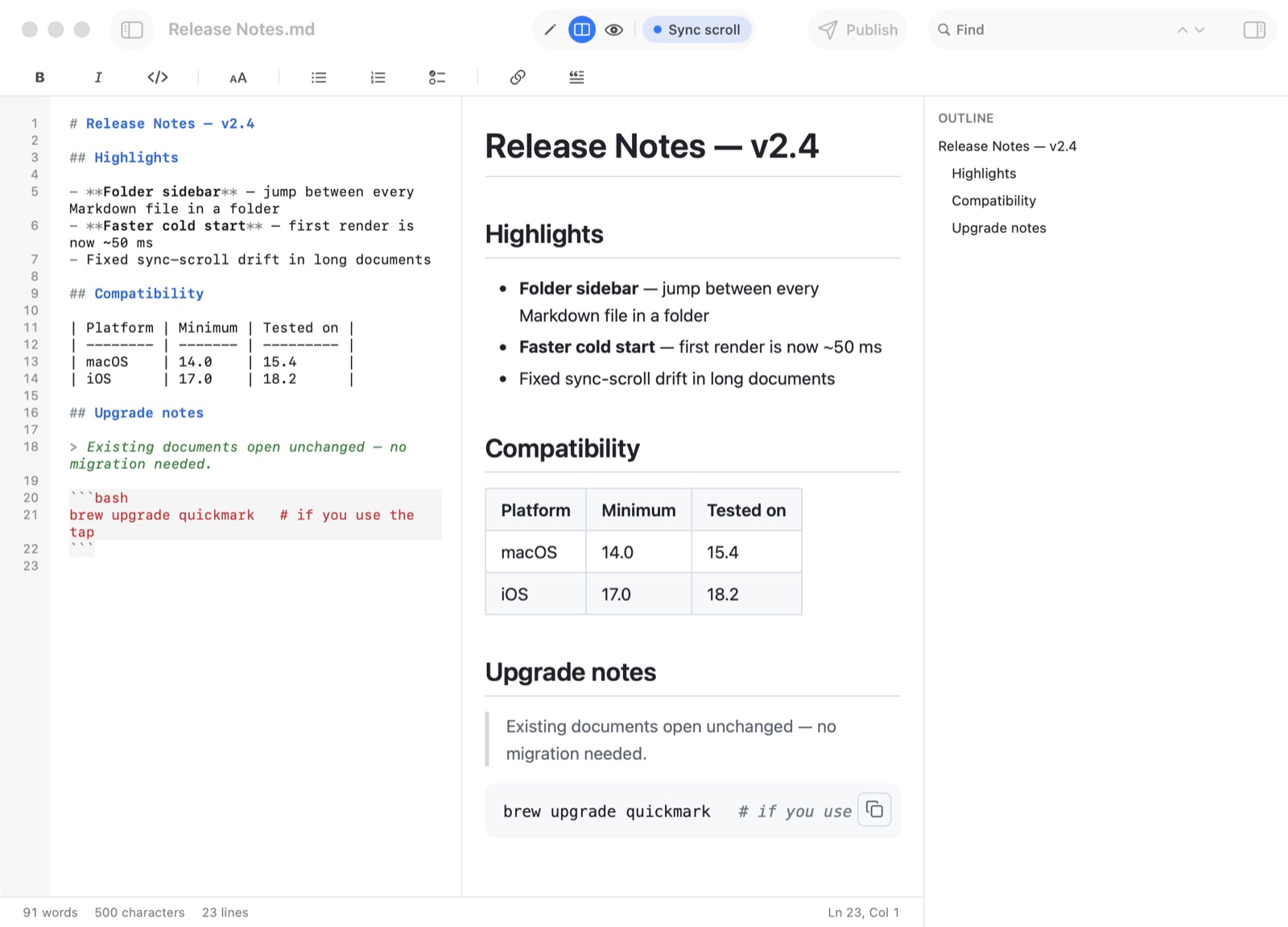
Neither approach is "right". Writers who find raw syntax distracting prefer Typora's. People who want their file to stay obviously plain text, and who read other people's Markdown a lot, tend to prefer a split view.
Where Typora wins
- Cross-platform. Typora runs on macOS, Windows and Linux, and one licence covers all three. QuickMark is Apple-only. If any part of your work happens on a PC or a Linux box, this alone probably decides it.
- Seamless typing feel. Nothing in QuickMark reproduces the sensation of markup melting away as you type. If you've tried it and liked it, you'll miss it.
- Mature desktop-writing extras: drag images straight into the document, a long-standing theme ecosystem, and a focus/typewriter mode refined over many years.
- One price, no tiers. $14.99 once, up to three devices, no feature gates afterwards. Simple, and some people prefer paying once for everything over a free app with any paid tier at all.
Where QuickMark wins
- Press Space in Finder. QuickMark installs a Quick Look extension, so any
.mdfile renders the instant you tap the space bar. No app launch, no window. If a chunk of your Markdown time is spent reading README files and notes rather than writing them, this changes the day-to-day more than any editor feature. Here's how it looks. - iPhone and iPad. Typora is desktop-only. QuickMark is one Universal app across Mac, iPhone and iPad, with a split view on iPad and live preview on the phone.
- Free to read and write. Editing, split view, preview, tabs, themes, Quick Look and print all cost nothing, with no trial clock. (Bulk export and web publishing sit behind a one-time Pro purchase.)
- Publish a document as a link. One tap turns a document into a clean read-only web page you can send to someone. No export, no attachment.
- A folder navigator. A sidebar lists every Markdown file next to the one you have open, so a folder of notes or a docs directory behaves like a small project.
Side by side
| QuickMark | Typora | |
|---|---|---|
| Platforms | macOS, iOS, iPadOS | macOS, Windows, Linux |
| Editing model | Editor / split / preview | Seamless inline (no panes) |
| Preview in Finder (Space) | Yes | No |
| Phone & tablet | Yes | No |
| Math & Mermaid diagrams | Yes | Yes |
| Export PDF / HTML / Word | Yes (+ EPUB, PNG, rich text) | Yes |
| Publish as a web link | Yes | No |
| Cost to read & write | Free | $14.99 once (3 devices) |
| Open source | No | No |
How to choose in ten seconds
- Any Windows or Linux in your life → Typora.
- You loved typing in Typora's seamless mode → Typora.
- You want Markdown on your phone and iPad too → QuickMark.
- You read as much Markdown as you write, in Finder → QuickMark.
- You want to try before paying anything → QuickMark (free), then decide.
Both are closed-source commercial apps by small teams, both handle math and diagrams properly, and both export cleanly, so whichever you pick, your files stay plain .md text you can take elsewhere. That's the real reassurance: with Markdown, switching costs are close to zero, so try one and move on if it doesn't fit.
Curious how the export side compares in practice? See converting Markdown to PDF on Mac and iPhone.
Get rendered Markdown previews everywhere
QuickMark is a free, native Markdown app for Mac, iPhone and iPad. Live preview, export and publish built in.