QuickMark vs iA Writer: a writing app, or a reading app?
Short answer: iA Writer is a writing instrument. It calls itself "a place where all you can do is write", and everything in it, from Focus Mode to Style Check, exists to make the sentence in front of you better. QuickMark is aimed at the other half of the job: opening Markdown, reading it properly, editing when you need to. If you are drafting a book, an essay or a newsletter, get iA Writer. If most of your Markdown was written by somebody else and you just need it to render, QuickMark is the shorter path.
I make QuickMark, so weigh the framing accordingly. Everything below about iA Writer comes from its own site and feature documentation, and where iA Writer is the better tool I say so plainly. It is a genuinely excellent app with a longer history than mine.
The one-line difference
iA Writer optimises the act of composing. Focus Mode "highlights the sentence or paragraph you're working on and fades everything else". Syntax Highlight colours your parts of speech so you can see the adjectives piling up. Style Check flags clichés and filler. None of that helps you read somebody else's README, and none of it is meant to.
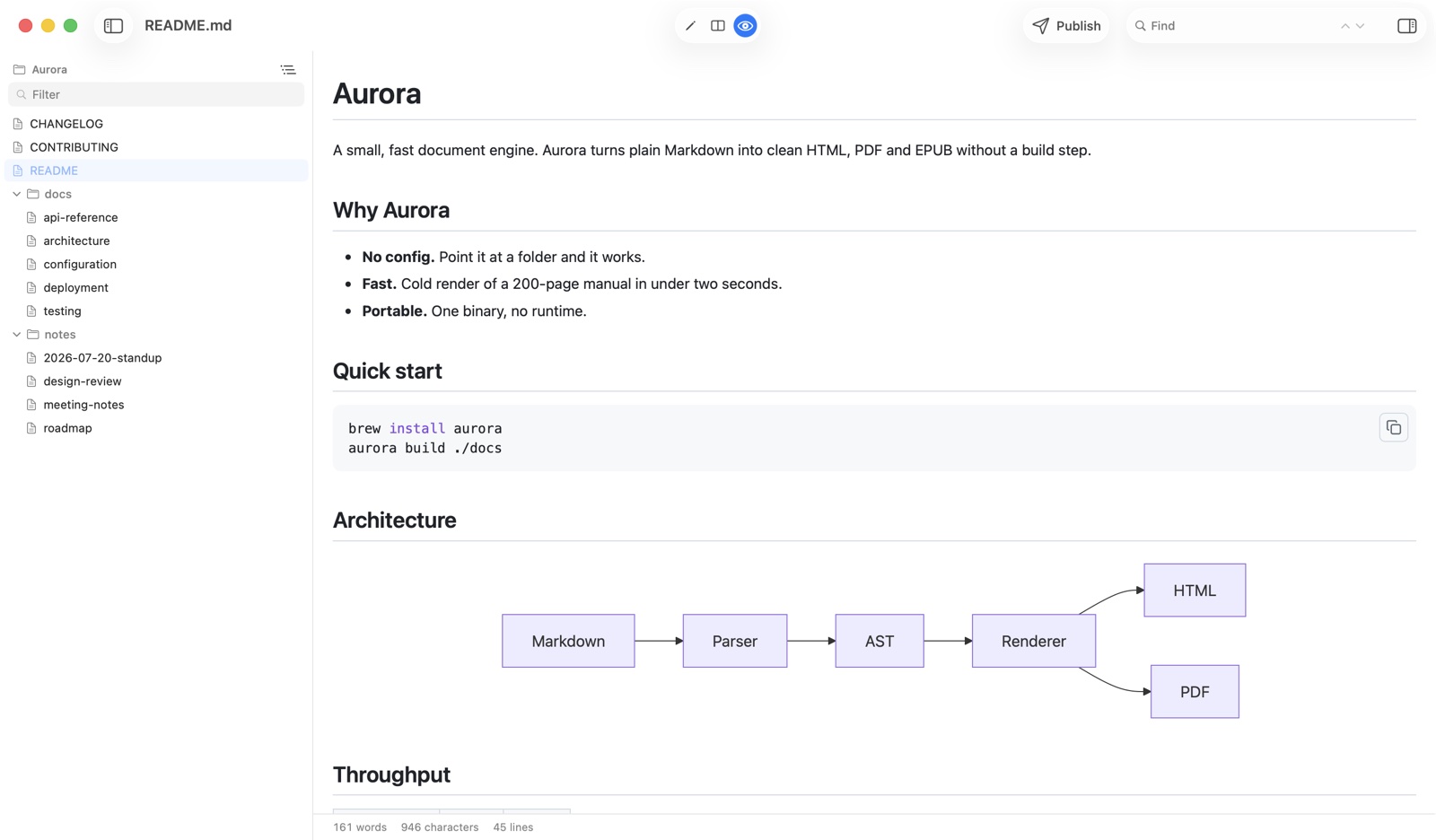
QuickMark starts from the file, not the sentence. Three modes (editor, split with synced scrolling, preview), plus a Quick Look extension so a .md file renders in Finder the moment you tap the space bar, with no app open at all.
Where iA Writer wins
- It actually helps you write better. Focus Mode, Syntax Highlight and Style Check are real craft tools, refined over years. QuickMark has nothing remotely like them, and if your problem is the quality of your prose rather than the rendering of your files, that gap is the whole decision.
- Authorship. iA Writer shows "what you typed and what you pasted" in different tones. In a year when everyone is arguing about which sentences came from a model, a writing app that quietly tracks provenance is a genuinely smart feature. Nothing in QuickMark does this.
- Windows. iA Writer runs on Mac, Windows, iPhone and iPad. QuickMark is Apple only. If your desk has a PC on it, this decides it.
- It publishes to real blogs. Ghost, Medium, WordPress, Micropub and Micro.blog, straight from the app. QuickMark can turn a document into a link on our own domain, which is a much smaller idea.
- Custom export templates. You can shape exactly how a PDF or HTML export looks. QuickMark gives you themes to pick from, not templates to author.
- Older Macs. iA Writer lists macOS 10.15; QuickMark needs macOS 14. If you are keeping an older machine alive, that matters more than any feature list.
- Search across everything you have written. Global document search on Mac, iPhone and iPad. QuickMark searches the document you have open, and nothing else.
Where QuickMark wins
- Press Space in Finder. The Quick Look extension ships inside the app, so any
.mdrenders instantly without launching anything. Here is what that looks like. iA Writer's feature documentation does not list Quick Look, so reading a stray file means opening it in the app. - Reading Markdown you did not write. A README in a repo you just cloned, release notes someone linked, a spec in your Downloads folder. A writing app is a heavy way to answer "what is in this file?"
- Diagrams. Mermaid flowcharts render inline, on the phone too, with nothing to install. iA Writer's feature page covers equation rendering but does not mention Mermaid.
- Six export formats. PDF, HTML, Word, EPUB, PNG and rich text you can paste into an email. iA Writer lists Word and PDF.
- A folder navigator. On Mac, a sidebar lists every Markdown file beside the one you have open, flat or as a tree, so a docs directory behaves like a small project.
- One purchase covers all three Apple devices. iA Writer is "pay once per platform", so a Mac and an iPad are two purchases. Worth knowing before you buy the first one.
- Free to read and write. Editing, split view, preview, tabs, themes, Quick Look and printing cost nothing, with no trial clock. iA Writer is paid, with a 7-day trial.
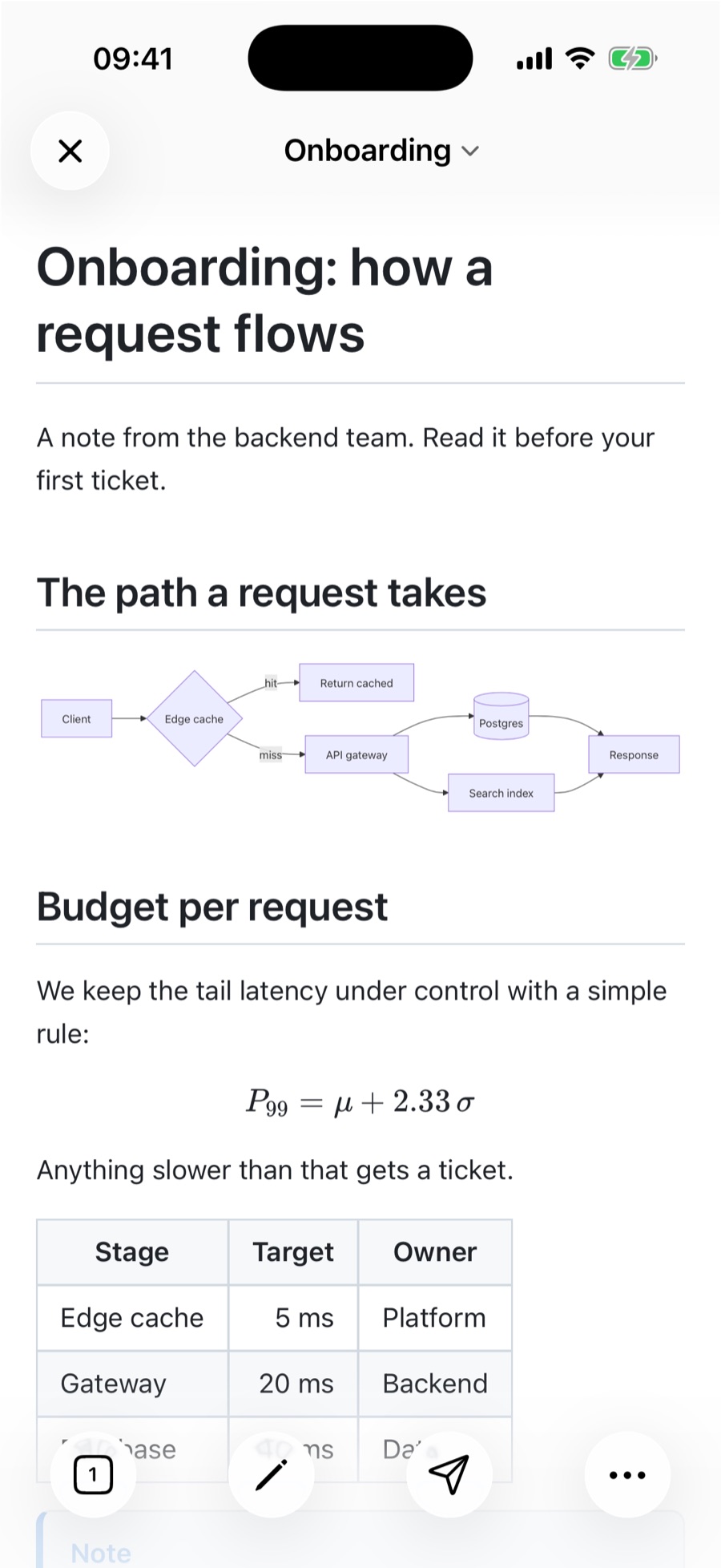
.md file. Nothing installed, nothing configured.One thing they both do
Math. It would be easy to list KaTeX as a QuickMark advantage, and it is not one: iA Writer renders equations too. If typeset formulas are what you came for, both apps have you covered, and you should pick on the other differences.
Side by side
| QuickMark | iA Writer | |
|---|---|---|
| Built for | Reading and editing files | Composing prose |
| Platforms | macOS, iOS, iPadOS | macOS, Windows, iOS, iPadOS |
| Minimum macOS | 14 (Sonoma) | 10.15 (Catalina) |
| Preview in Finder (Space) | Built in | Not listed on their site |
| Math | Yes (KaTeX) | Yes |
| Mermaid diagrams | Yes | Not listed on their site |
| Focus Mode / Style Check | No | Yes |
| Authorship (typed vs pasted) | No | Yes |
| Export | PDF, HTML, Word, EPUB, PNG, rich text | Word, PDF, custom templates |
| Publish to Ghost / WordPress / Medium | No | Yes |
| Publish as a standalone link | Yes | No |
| Search across all your documents | No | Yes |
| Folder / file navigator | Yes (Mac) | Not listed on their site |
| Buying model | One purchase, all three Apple devices | Pay once per platform |
| Cost to read and write | Free | Paid, 7-day trial |
Rows that say "not listed on their site" mean exactly that. iA Writer is a deep app and I have read its documentation, not run every build of it, so I am reporting what they publish rather than declaring what is impossible.
How to choose in ten seconds
- You are drafting long prose and want help making it better → iA Writer.
- You write on a PC as well as a Mac → iA Writer.
- You publish to a blog platform → iA Writer.
- You care about tracking what you typed versus pasted → iA Writer.
- Most of the Markdown you touch was written by someone else → QuickMark.
- You want files to render in Finder without opening an app → QuickMark.
- You want one purchase to cover your Mac, iPhone and iPad → QuickMark.
A fair word about single-purpose apps
iA Writer has spent more than a decade removing things. That is harder than adding them, and the result is an app with a clear opinion about what writing should feel like. Plenty of people find that opinion is exactly right for them, and no amount of rendering features would tempt them away. I would not try.
What I would say is that "working with Markdown" is two jobs, not one, and most tools pick a side without telling you. iA Writer picked composing. QuickMark picked the file: opening it, reading it, fixing a line, sending it on. If you do a lot of both, running both is not a compromise. They are plain .md files, so nothing stops you.
If you want to see how the two compare against other apps in this space, there is QuickMark vs Typora for the other big writing-first app, and QuickMark vs Marked if a dedicated previewer is what you are really after.
Want to see how QuickMark renders your own Markdown before installing anything? Paste it into the live preview in your browser.
Get rendered Markdown previews everywhere
QuickMark is a free, native Markdown app for Mac, iPhone and iPad. Live preview, export and publish built in.