Markdown vs Rich Text vs Plain Text: What's the Difference?
Plain text is just characters: no bold, no headings, nothing but the words. Rich text stores the formatting inside the file, the way Word, Pages, RTF and most email does, so you see bold but can't read the file without the right app. Markdown sits in between. It is plain text, but a few symbols like # and ** describe the formatting, so the file reads fine in any text editor and turns into a formatted page in an app that renders it. Pick plain text for scraps, rich text for documents you hand to someone who will open them in Word, and Markdown for anything you'll keep, edit, search or put under version control.
That's the short answer. The rest of this post puts numbers on it. I saved one small note in all three forms and measured what changed: size, what survives a conversion, and what a one-number edit looks like in Git.
The three formats side by side
| Plain text | Markdown | Rich text | |
|---|---|---|---|
| Typical files | .txt | .md, .markdown | .docx, .rtf, .pages, email |
| Where formatting lives | Nowhere | In visible symbols | In hidden codes or XML |
| Readable in any text editor | Yes | Yes | RTF barely, DOCX no (it's a zip) |
| Headings, lists, tables, links | No | Yes | Yes |
| Fonts, colours, page layout | No | No, the app decides | Yes |
| Clean diffs in Git | Yes | Yes | No |
| Best for | Scraps, logs, config | Notes, docs, READMEs, journals | Documents others will edit in Word |
One note, three files: what I measured
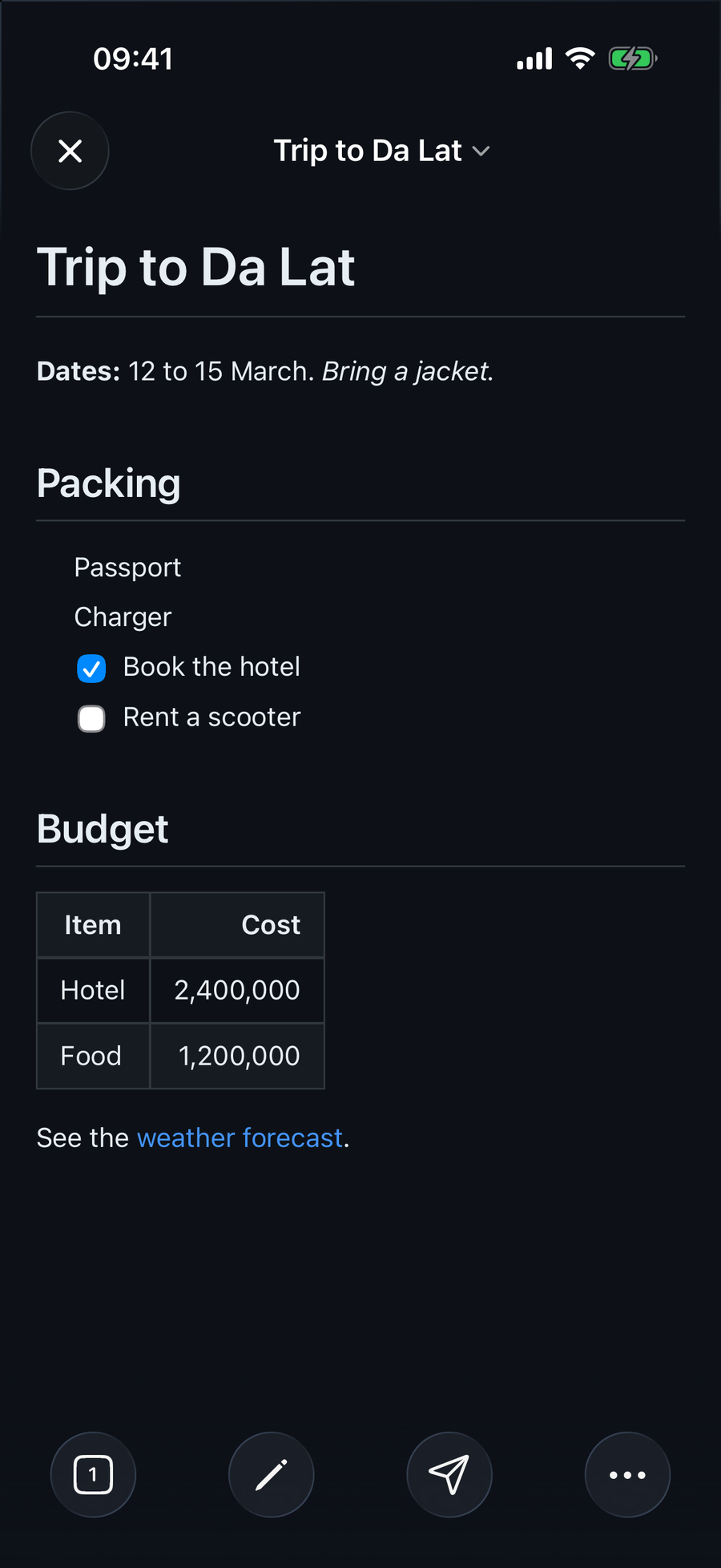
The test document is a short trip note: a heading, a bold line, a packing list with two checkboxes, a two-row budget table and one link. Eighteen lines of Markdown.
# Trip to Da Lat

**Dates:** 12 to 15 March. *Bring a jacket.*

## Packing
- Passport
- Charger
- [x] Book the hotel
- [ ] Rent a scooter

## Budget

| Item | Cost |
| --- | ---: |
| Hotel | 2,400,000 |
| Food | 1,200,000 |

See the [weather forecast](https://example.com/weather).Two headings, a bold label and an italic reminder, a packing list with one ticked and one empty checkbox, a two-column table with the costs right-aligned, and a working link.
I rendered it with QuickMark's own renderer, exported a Word file with QuickMark's own Word exporter, and used macOS's built-in textutil (the converter behind TextEdit) to make the RTF and plain text versions. Here's what came out:
| File | Size | Lines | Compared to the .md |
|---|---|---|---|
notes.txt (plain) | 203 bytes | 15 | Smaller, but formatting and the link are gone |
notes.md (Markdown) | 282 bytes | 18 | Baseline |
notes.rtf (TextEdit) | 3,924 bytes | 62 | About 14 times larger |
notes.docx (TextEdit) | 3,826 bytes | zip | About 14 times larger |
notes.docx (QuickMark export) | 9,393 bytes | zip of 18 files | About 33 times larger |
Size on its own doesn't matter much; nobody runs out of disk over a trip note. What the numbers show is where the formatting went. In the .md file it's a handful of visible characters. In the RTF it's 62 lines of control words like \fonttbl, \trowd and \cssrgb before you reach your own sentences. The Word file is a zip archive holding 18 separate parts (document.xml, styles.xml, numbering.xml, and so on). QuickMark's Word file is bigger than TextEdit's mostly because it ships more of those parts: styles, list numbering, and placeholder footnote, endnote and comment parts that Word expects to find.
The Git test: change one number
I committed all three files, changed the hotel cost from 2,400,000 to 2,600,000, and asked Git what changed.
The Markdown file:
 | Item | Cost |
 | --- | ---: |
-| Hotel | 2,400,000 |
+| Hotel | 2,600,000 |
 | Food | 1,200,000 |
The Word file:
Binary files a/notes-qm.docx and b/notes-qm.docx differThat's the whole report for the Word file. It went from 9,393 to 9,391 bytes and Git can't tell you why. The RTF file did produce a one-line diff, because RTF is technically text, but that line sits inside formatting codes and it's the only part of the file a person can read at a glance. This is why READMEs, docs sites and changelogs are almost always Markdown: a reviewer sees exactly what changed.
What plain text throws away
Going the other way, from formatted to plain text, loses more than bold. When textutil turned the rendered note into a .txt:
- The link URL vanished. "See the weather forecast." survived;
https://example.com/weatherdid not. - The checkboxes lost their state. "Book the hotel" (done) and "Rent a scooter" (not done) came out as identical bullets.
- The table fell apart. Each cell landed on its own line: Item, Cost, Hotel, 2,400,000, Food, 1,200,000.
- Headings became ordinary lines. "Packing" and "Budget" look just like the text under them.
Markdown keeps every one of those as text you can see: [x], the pipes of the table, the URL in round brackets. It's 79 bytes more than the plain version and nothing is lost.
Every plain text file is already Markdown (almost)
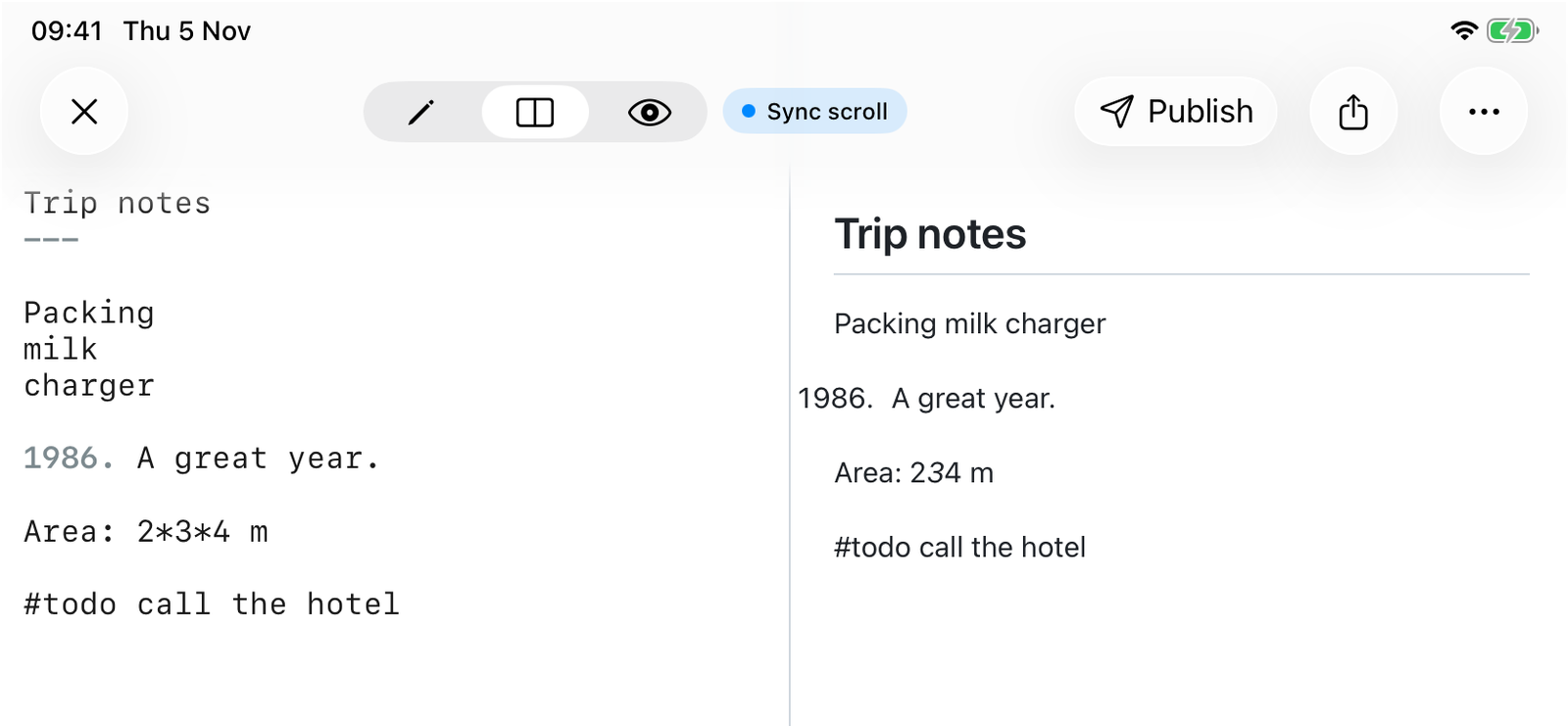
Markdown was designed so that ordinary text renders sensibly. Open a .txt file as Markdown and most of it looks the same. Most. I ran a few everyday lines through QuickMark's renderer to see which ones change:
| Plain text line | Rendered as Markdown |
|---|---|
Three lines: Packing, milk, charger | One line: "Packing milk charger" |
Trip notes with --- on the next line | A heading |
1986. A great year. | A numbered list that starts at 1986 |
Area: 2*3*4 m | "Area: 234 m" with the 3 in italics |
# not a comment | A heading |
#todo call the hotel | Unchanged (no space after #, so not a heading) |
Price: $5 and $10 | Unchanged (not treated as math) |
file_name_v2.txt | Unchanged (underscores inside a word stay literal) |
The first one surprises people most. In Markdown a single line break is just a space; you need a blank line between paragraphs, or a list marker in front of each item. The fixes for the rest are in how to escape characters in Markdown: a backslash, as in 1986\. or 2\*3\*4, keeps the character as typed.
Moving between the three in QuickMark
Here's what the app actually does with each format, checked against its source code rather than from memory:
- Opening plain text: QuickMark opens
.mdfiles and any plain text file, including.txt, on Mac, iPhone and iPad. A.txtis shown rendered as Markdown, with the quirks from the table above. - Opening rich text: it doesn't.
.rtf,.docxand.pagesfiles aren't in the list of types the app accepts. If you need to bring a Word document over, convert it first with a tool like Pandoc. - Pasting rich text into the editor: the editor is plain text only, so pasting from a web page or an email brings the words and drops the formatting. It does not convert bold into
**bold**or a link into[text](url). You get the text; the Markdown you add yourself. - Getting rich text out, on the Mac: File ▸ Copy ▸ Copy as Rich Text (⌥⇧⌘C) puts the rendered document on the clipboard as RTF, HTML and plain text at once, so Mail, Pages or Google Docs each take the version they paste best. The full walkthrough is in how to paste Markdown as rich text. On iPhone and iPad this menu item isn't there yet.
- Getting the Markdown itself out, on the Mac: Copy Markdown Source (⌥⌘C) in the same File ▸ Copy menu copies the whole document as plain text, symbols included, whatever you have selected.
- Getting a Word file out: the Word (.docx) export works on Mac, iPhone and iPad. That's the 9,393-byte file from the test above; the Word export post lists what carries over and what doesn't.
Which one should you use?
My rule of thumb:
- Plain text when the content has no structure at all: a list of serial numbers, a log, a scratch note you'll delete tomorrow.
- Rich text when the recipient lives in Word or Pages and will edit the document there, or when the layout itself matters: letterheads, contracts, anything with page-exact formatting. Markdown doesn't do fonts or margins, and it doesn't pretend to.
- Markdown for everything you write for yourself and keep: notes, docs, a daily journal, a README. You get structure, the file stays readable without any app, and when someone does need a Word file or an email, you can make one from it in a few seconds.
Going from Markdown to rich text is one command. Going from rich text back to clean Markdown is a cleanup job. That asymmetry is the strongest argument for writing in Markdown first.
Get rendered Markdown previews everywhere
QuickMark is a free, native Markdown app for Mac, iPhone and iPad. Live preview, export and publish built in.