
How to Add Comments in Markdown (Hidden Notes That Stay Hidden)
To add a comment in Markdown, wrap it in an HTML comment: <!-- your note -->. It stays in the file and disappears from the rendered page, on GitHub, in QuickMark and in almost every other Markdown app. If you want something that looks less like HTML, [//]: # (your note) on its own line, with a blank line above it, is hidden too. Everything else people suggest, like Obsidian's %%, only works in the one app that invented it.
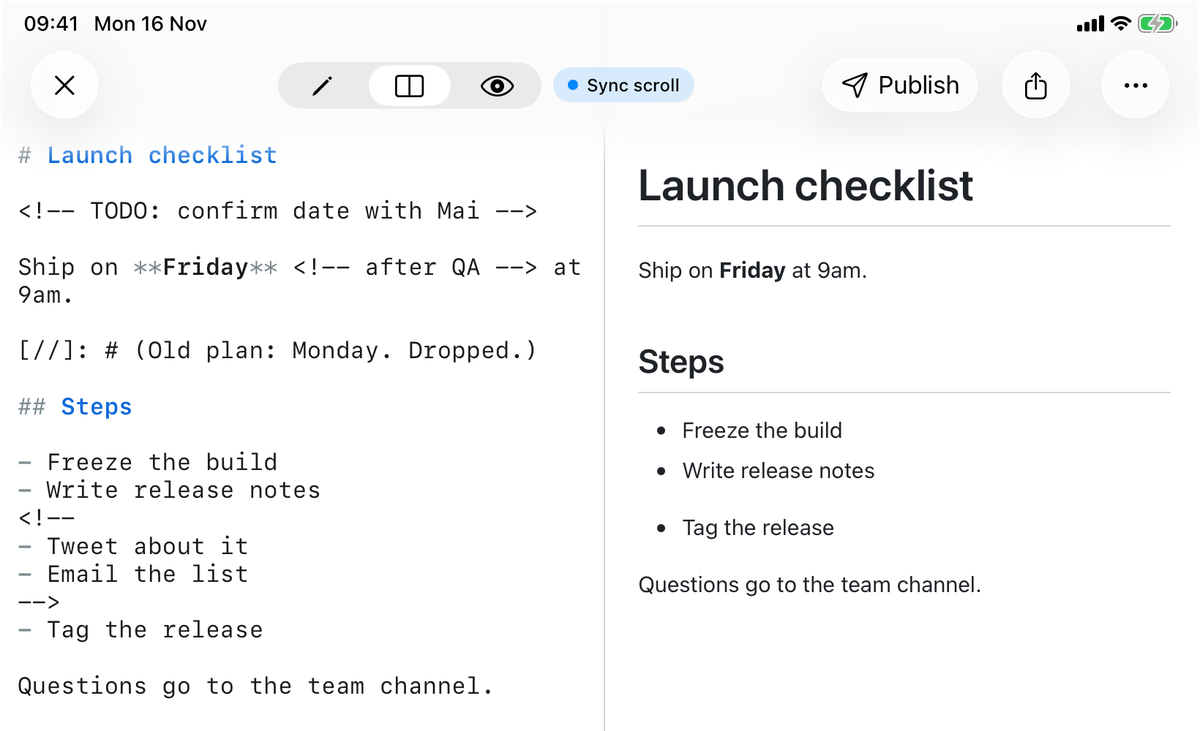
To be sure about every rule below I ran 25 small inputs through QuickMark's renderer (the same code behind the app, Quick Look and published pages) and sent the same 25 through GitHub's Markdown API. 23 came out identical. The two that differ are covered further down.
The HTML comment: the one that works everywhere
Launch is on Friday.

<!-- TODO: confirm with Mai -->

Ship it <!-- after QA --> at 9am.

<!--
Old plan: Monday.
Dropped after the review.
-->

Questions go to the team.Launch is on Friday.
Ship it at 9am.
Questions go to the team.
It works on its own line, in the middle of a sentence, and across as many lines as you like. Blank lines inside the comment are fine too: a comment that starts with <!-- runs until the first -->, whatever is in between. Markdown inside it is not rendered, so you can comment out a whole section, headings and all.
This is the form to use if the file might be read anywhere else. It is plain HTML, so any Markdown renderer that accepts HTML (and nearly all of them do) treats it as a comment.
The link-reference trick: [//]: #
The second form hides text inside a link definition that nothing ever points to. Markdown never prints link definitions, so the text never shows. All four of these spellings were hidden in both QuickMark and GitHub:
[//]: # (This is a comment)
[//]: # "This is a comment"
[//]: <> (This is a comment)
[comment]: <> (This is a comment)
It is more fragile than it looks, though. Two of my test lines leaked straight onto the page:
| Input | QuickMark and GitHub |
|---|---|
[//]: # (comment) with a blank line above | Hidden |
| The same line directly under a line of text | Shown as part of that paragraph |
[//]: # (a (nested) comment) | Shown: the inner brackets break it |
[//]: # (don't show) | Hidden, apostrophes are fine |
| The note wrapped onto a second line inside the brackets | Hidden |
The first one catches most people. A link definition cannot interrupt a paragraph, so if your comment sits right under a line of text, Markdown reads it as more of that text. Always leave a blank line above it. An HTML comment does not have this problem: it can follow a paragraph line directly.
What does not work outside its own app
Obsidian has its own comment syntax, %%like this%%. Its help page says these comments only show in Editing view and suggests an HTML comment if you need the text hidden in other apps. That advice is right. In QuickMark and on GitHub, %% hidden %% prints exactly as typed, percent signs included. If your notes leave Obsidian (a README, a published page, a file you send someone), use <!-- --> instead.
There is no comment syntax in the CommonMark spec or in GitHub Flavored Markdown. The HTML comment works because both allow raw HTML, not because Markdown has a feature for it.
Places where a comment behaves differently
Inside a code block, a comment is just text, which is exactly what you want when you are documenting comments. The same goes for inline code: `<!-- -->` shows the characters. Indent a comment four spaces and it turns into a code block too, so it shows up.
Inside a table cell or a single list item it hides cleanly. Between two list items it does something less obvious:
- Freeze the build
- Write release notes
<!--
- Tweet about it
-->
- Tag the release- Freeze the build
- Write release notes
- Tag the release
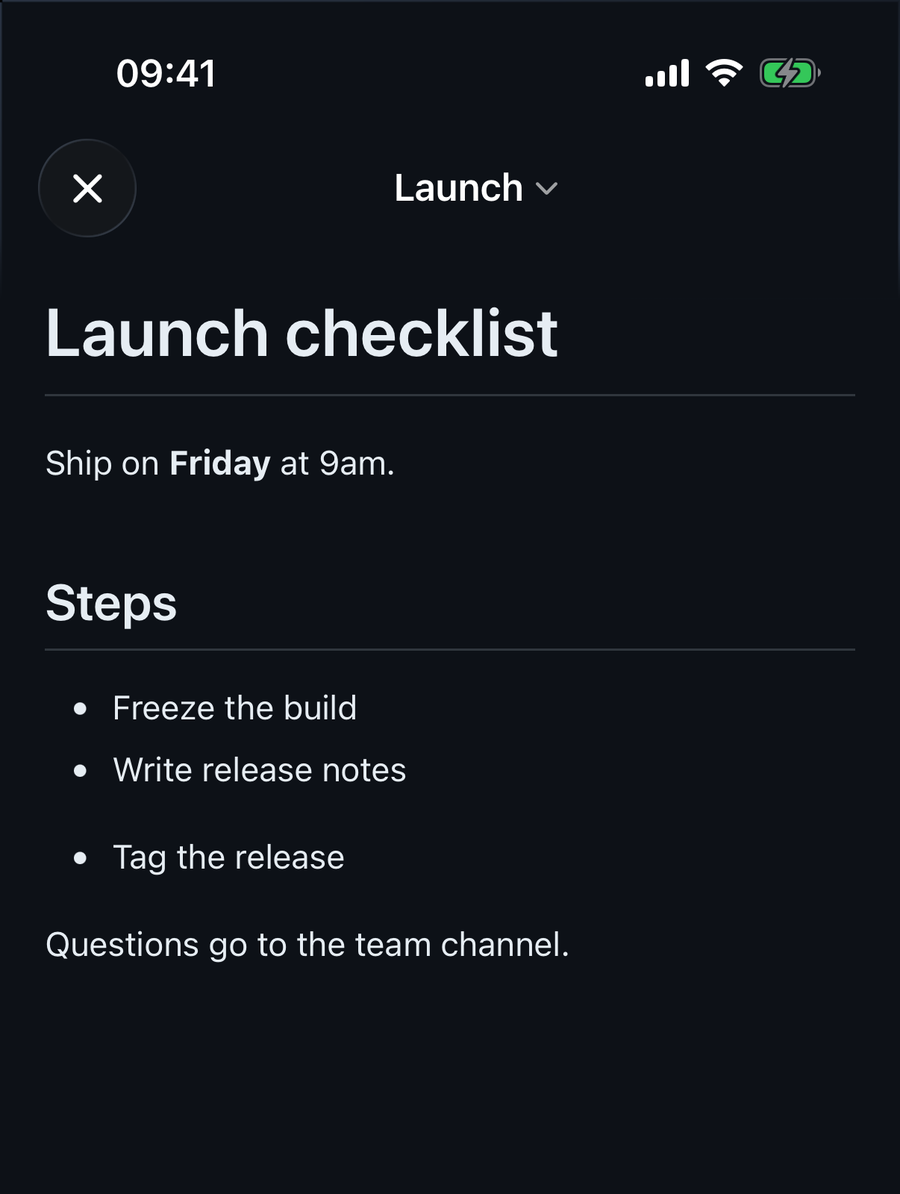
The comment ends the list, and the item after it starts a second list. GitHub does the same. Usually all you see is a slightly bigger gap, the one visible in the screenshots. If you want one tidy list, indent the comment two spaces so it belongs to the item above it. Then the list stays in one piece, in QuickMark and on GitHub:
- Write release notes
  <!--
  - Tweet about it
  -->
- Tag the release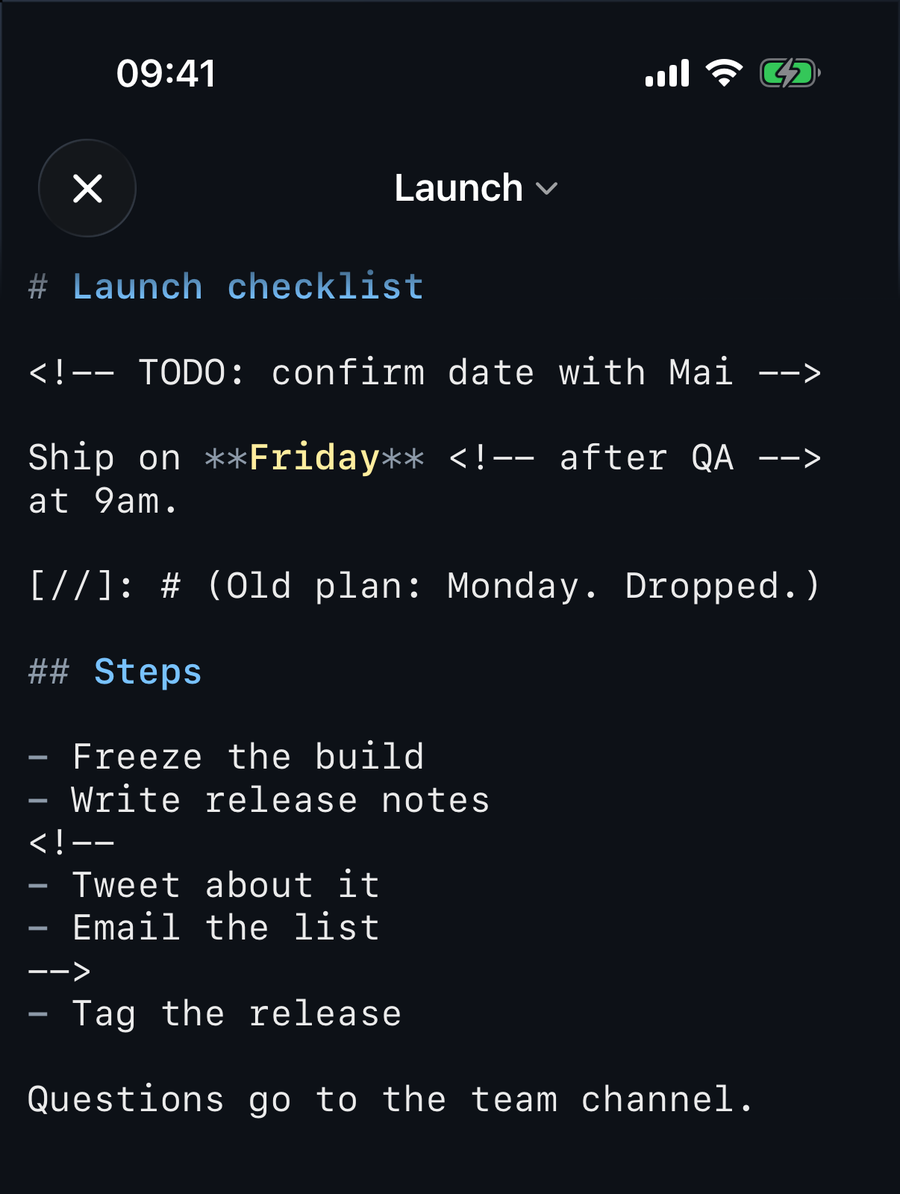
The two cases where QuickMark and GitHub disagree
A comment you forget to close. Write <!-- and never add -->, and GitHub hides everything from that point to the end of the file. No warning, the rest of the document is just gone. QuickMark shows the rest of the file as raw text instead, so the missing --> is obvious the moment you look at the preview.
One special comment. <!-- pagebreak --> (also <!-- page-break -->) is a page break in QuickMark: a dashed line on screen and a new page when you print or export a PDF. On GitHub it is an ordinary hidden comment. More on that in how to print a Markdown file cleanly.
Hidden is not the same as removed
A comment is invisible on the rendered page, but it is still in the file. Anyone who opens the .md reads it. Before you share the source, search it for <!-- and [//].
In QuickMark, what you send depends on how you send it:
- Exports built from the preview (PDF, HTML, PNG, EPUB and Print, plus Copy as Rich Text on the Mac) contain what the preview shows, so the comments are not in them.
- Sharing the file itself sends every comment along with it.
- A published web page renders without comments, but by default visitors can also download the original
.md, comments included. If your notes are private, untick Let visitors download the .md under Source file in the publish options. With it off, the raw file is not served to visitors at all. The rest of the publishing flow is in how to publish a Markdown doc as a web link.
Honest gaps
QuickMark's editor does not dim comments or color them differently. They look like any other line of text, as the iPhone screenshot shows. There is also no keyboard shortcut to comment out a line, on the Mac or on iOS, so you type <!-- and --> yourself. Code editors such as VS Code have a toggle for this. If you comment out big blocks often, that is a real difference.
Quick reference
| Syntax | Hidden in QuickMark and GitHub? | Notes |
|---|---|---|
<!-- note --> | Yes | Works inline, on its own line, and across lines. The safest choice. |
[//]: # (note) | Yes | Needs a blank line above. No brackets inside the note. |
[comment]: <> (note) | Yes | Same rules as above. |
%% note %% | No | Obsidian only. Shows as plain text elsewhere. |
<!-- pagebreak --> | Yes | A page break in QuickMark's print and PDF. |
If a comment shows up where it should not, the cause is almost always one of three things: a missing blank line above a [//]: # line, brackets inside it, or four spaces of indentation. For the characters Markdown treats as special, see how to escape special characters in Markdown.

Get rendered Markdown previews everywhere
QuickMark is a free, native Markdown app for Mac, iPhone and iPad. Live preview, export and publish built in.